If you’re searching “JobShinobi vs Jobscan pricing”, you’re likely in “ready-to-buy” mode and trying to answer a practical question:
- Is Jobscan worth its premium price if I’m applying to lots of jobs?
- Or does JobShinobi give me enough ATS/resume help plus more job-search workflow for less?
This comparison focuses on what you pay, what you get, and who each option is best for—including where Jobscan legitimately wins.
Quick Verdict:
- Choose Jobscan if you want a more established, all-in-one job-search toolkit with unlimited scans on paid, plus extras like LinkedIn optimization, AI cover letter tools, and a job tracker + Chrome extension—and you’re okay paying premium pricing.
- Choose JobShinobi if you want the best price-to-value for an integrated workflow—especially if you care about AI resume scoring + job matching + LaTeX editing + version history and the standout feature: email-forwarding that automatically tracks job applications.
Verification note (transparency): Many Jobscan marketing URLs returned HTTP 403 to our page analyzer, so pricing/features were verified via Google-indexed snippets (notably app.jobscan.co/plan) plus reputable review sources (e.g., Sitejabber, Trustpilot) and Jobscan support article snippets when available.
TL;DR Comparison
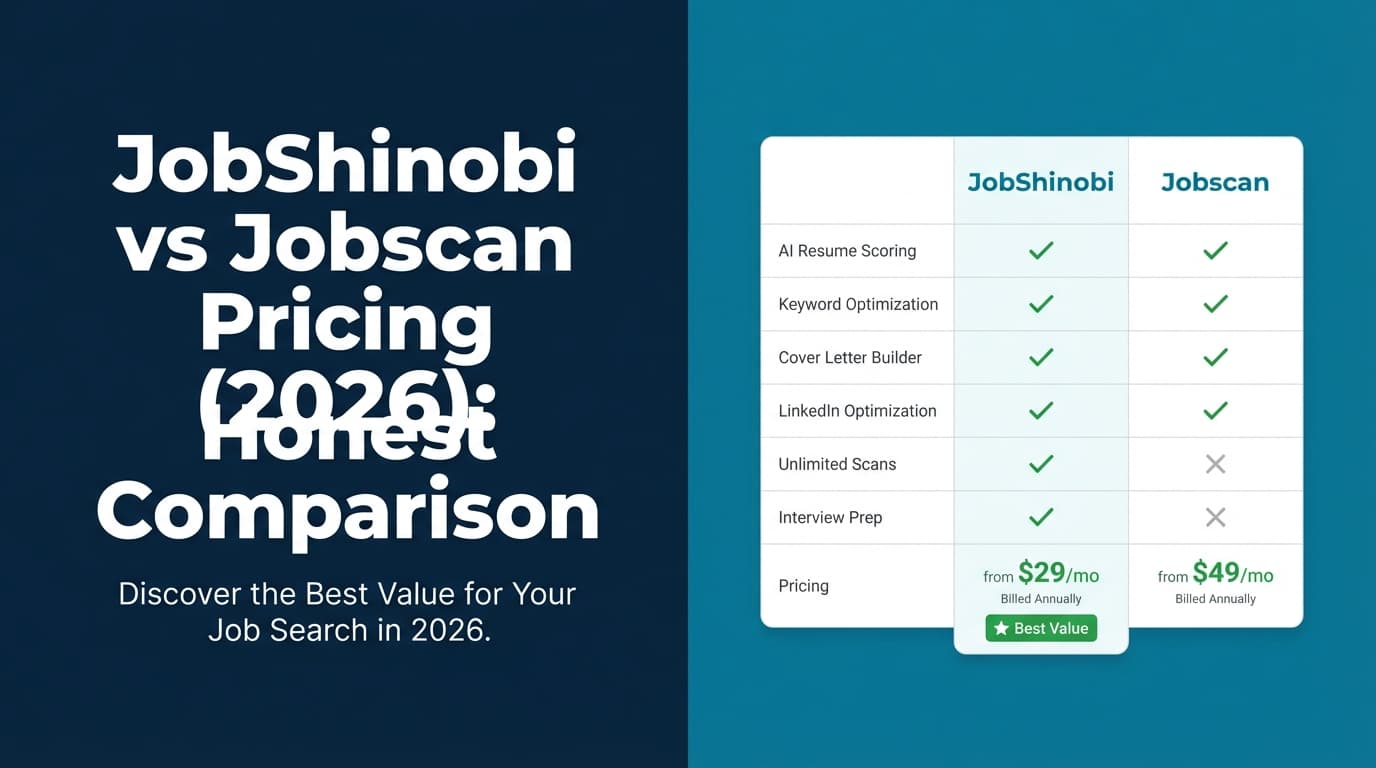
| Feature | JobShinobi | Jobscan |
|---|---|---|
| Best for | Job seekers who want ATS improvement + automation + tracking in one place | Job seekers who want a mature ATS scanning workflow + lots of job-search add-ons |
| ATS-style resume scan | ✅ Yes (resume scoring + ATS/keyword feedback) | ✅ Yes (core product) |
| Job matching vs a JD | ✅ Yes (job description extraction + match insights) | ✅ Yes (AI Job Match referenced on plan page snippets) |
| Resume editor style | LaTeX-first editor + PDF preview | More “standard” resume tool ecosystem (generally easier for non-LaTeX users) |
| Job tracking | ✅ Yes (tracker + analytics + export) + email-forwarding automation (Pro) | ✅ Yes (Job Tracker + Chrome extension to save jobs) |
| Automation for tracking | ✅ Email-forwarding → auto log applications | Mostly manual/extension-based (save jobs, manage tracker) |
| Starting price | $20/month | $0 (free plan) |
| Paid plan most people compare | $20/mo or $199.99/yr | $49.95/mo (Premium) or $89.95/quarter (~$29.98/mo) |
| Free plan limits | Limited; key automation gated to Pro | Free plan includes limited scans (commonly: 5/month) + basic tools |
| Best “pricing value” | ✅ Lower monthly cost for a full workflow | ✅ Free plan to try scanning; quarterly discount option |
JobShinobi Overview
JobShinobi is an AI resume + ATS optimization platform that also acts like a lightweight job-search CRM. The goal is to help you:
- tailor and improve your resume for ATS screening, and
- stay organized across applications without living in spreadsheets.
What makes JobShinobi meaningfully different is email-forwarding job tracking. You forward job-related emails (application confirmations, interview scheduling, offers/rejections), and JobShinobi uses AI to extract details and update your tracker automatically (Pro feature). It also uses fuzzy matching to avoid duplicate entries.
On the resume side, JobShinobi is LaTeX-first (with cloud compilation + PDF preview), offers version history, and includes an AI chat agent that can help rewrite, tailor, and iterate.
Key Strengths
- Email-forwarding → automatic job tracking (Pro): minimal manual entry.
- Resume scoring + ATS/keyword feedback: structured score breakdowns and keyword insights.
- Job description extraction + resume-to-job match: paste a URL or JD text and get match insights.
- Version history (“unlimited undo” behavior): revert to earlier versions when tailoring.
- Export + analytics: track outcomes and export your applications (e.g., Excel).
Limitations (Honest)
- LaTeX workflow can be a learning curve if you prefer Word/Google Docs style editing.
- Free tier is limited: key automation (especially email processing/tracking) is Pro-gated.
- Trial detail: marketing mentions a “7-day free trial,” but the exact enforcement may be billing-configured rather than obvious in app logic.
Jobscan Overview
Jobscan is one of the most recognized names in the ATS resume scanning category. It’s built around a core promise: compare your resume to a job description, identify gaps, and optimize for keywords, formatting, and alignment.
What’s easy to miss: Jobscan also positions itself as a broader job-search toolkit. Verified plan page snippets reference a free tier that includes Job Tracker, Post Interview Thank You Notes, Job Board, and a Resume Builder in addition to limited scans.
Key Strengths (verified via plan/review sources)
- Strong ATS resume scanning workflow: Jobscan is widely used for resume-to-job comparisons.
- Free plan that’s actually usable: commonly cited as $0 forever with limited scans (often shown as 5 on signup + 5 monthly).
- Job Tracker + Chrome extension: Chrome Web Store listing indicates a Jobscan job-search tracker extension to save jobs from boards like Indeed/LinkedIn/Glassdoor.
- Premium tools around optimization: plan snippets reference features like One-Click AI Optimize (desktop-only), AI cover letter generator, AI bullet point generator (desktop-only), and LinkedIn optimization (notably “after trial” for some users/plans).
Limitations (from common review themes)
- Monthly premium pricing is high compared to most job-seeker tools.
- Some users dislike “score chasing”: Resume optimization tools can encourage writing to a score instead of writing for recruiters (the risk is keyword stuffing or awkward phrasing).
- Billing/cancellation frustrations show up in reviews: Sitejabber includes complaints about charges after trial and refund difficulty (experiences vary).
Feature-by-Feature Comparison (What matters for pricing value)
Resume scanning & ATS feedback
JobShinobi:
Resume scoring with structured breakdowns (keywords/ATS/formatting/content) plus job matching and tailoring insights.
Jobscan:
This is Jobscan’s core strength: mature, well-known resume scanning workflow and a lot of adjacent content/training around ATS.
Winner: Jobscan for pure “scanner maturity,” JobShinobi for integrated workflow at a lower monthly price.
AI optimization tools (cover letter, bullets, etc.)
JobShinobi:
AI resume agent (chat-based) that can modify your resume while preserving structure; supports multiple AI model tiers.
Jobscan:
Plan snippets and product pages indicate premium includes AI cover letter generation, AI bullet point generation, and One-Click Optimize (often marked desktop-only).
Winner: Jobscan if you want a “bundle” of AI generators; JobShinobi if you want an AI agent tightly integrated with version history and LaTeX editing.
Job tracking & job search organization
JobShinobi:
- Job tracker with realtime updates
- analytics dashboard (response rate, interview conversion, trends)
- export to Excel
- email-forwarding automation to log applications and status changes (Pro)
Jobscan:
- Job Tracker included (even referenced in free plan snippets)
- Chrome extension available (Chrome Web Store listing) to save jobs from job boards
- Post-interview thank-you note features referenced
Winner:
- JobShinobi for automation + analytics (especially email-forwarding auto logging).
- Jobscan for browser-based job saving via extension and an established tracker ecosystem.
Pricing Comparison (Verified 2026-01-21)
JobShinobi pricing (from product documentation)
- Pro Monthly: $20.00/month
- Pro Yearly: $199.99/year
Free tier exists but key automation (notably email processing for tracking) is gated to Pro.
Jobscan pricing (verified via app plan snippets & multiple sources)
- Free: $0 forever
- commonly shown: 5 free resume scans on signup + 5 free resume scans monthly
- also referenced: 5 ATS & Recruiter Findings, Job Tracker, Post Interview Thank You Notes, Job Board, Resume Builder
- Premium Monthly: $49.95/month (billed monthly)
- Premium Quarterly: $29.98/month equivalent billed as $89.95 every 3 months
- often shown with a free trial (commonly “Try 2 Weeks Free”)
Annual plan note: One Jobscan comparison snippet (“Jobscan vs Resume Worded”) states yearly is not currently offered. This can change—always confirm on Jobscan’s plan page.
Which is cheaper?
- If you’re paying monthly: JobShinobi ($20/mo) is significantly cheaper than Jobscan ($49.95/mo).
- If you’re willing to pay quarterly: Jobscan’s effective price drops to about $29.98/mo, but it’s still higher than JobShinobi monthly.
- If you only need occasional scans: Jobscan’s free plan may be enough (and it’s the cheapest option).
Who Should Choose JobShinobi?
Choose JobShinobi if you:
- Want a lower monthly cost ($20/mo) for an integrated job-search workflow.
- Want job tracking that updates automatically via email-forwarding (application confirmations, interview emails, etc.).
- Prefer a system built around resume versions (tailor for different roles without losing prior drafts).
- Like the idea of a LaTeX-first resume with PDF preview and controlled formatting.
Who Should Choose Jobscan?
Choose Jobscan if you:
- Want the most established, widely recognized ATS resume scanner experience.
- Want a free plan to test scanning before paying.
- Value a bundle that includes job tracking + Chrome extension + cover letter/bullet tools + LinkedIn optimization.
- Are applying to many jobs and want unlimited scanning with a familiar workflow (and you accept the premium price).
Switching from Jobscan to JobShinobi (Practical notes)
- Workflow shift: JobShinobi’s differentiator is tracking automation (email-forwarding). If you’re used to Jobscan’s extension-based “save job” approach, this will feel different.
- Resume editing: If you don’t want to touch formatting controls, Jobscan may feel easier. If you want deeper control and versioning, JobShinobi is stronger.
- Migration: There’s no claim of a one-click import from Jobscan. Most users start fresh in JobShinobi and keep Jobscan history separately if needed.
FAQ
Is Jobscan worth paying for?
It can be—especially if you (a) want unlimited scans, (b) like their scan/report workflow, and (c) will use the extra tools (LinkedIn optimizer, AI cover letter/bullets, job tracker). The biggest drawback is cost: $49.95/month is premium-priced for an individual job seeker.
Is JobShinobi really better than Jobscan?
Not universally. Jobscan can win on familiarity, ecosystem maturity, and a richer bundle of job-search add-ons. JobShinobi tends to win on value for money, tracking automation via email-forwarding, and the resume editing/versioning workflow.
Which one has the better free plan?
Jobscan. It’s clearly positioned with a $0 plan that includes limited scans and basic job-search tools. JobShinobi has a free tier, but key automation is gated to Pro.
Does Jobscan have a job tracker?
Yes. Jobscan’s plan snippets reference Job Tracker, and there is a Jobscan Job Search Tracker Chrome extension listed on the Chrome Web Store. The key difference is that JobShinobi emphasizes email-based automation, while Jobscan emphasizes saving jobs and managing them in a tracker.
Which is best if I’m applying to 30–50 jobs/month?
If you need unlimited scanning, Jobscan’s paid plan may fit better. If your bigger problem is staying organized across applications and you want tracking automation plus ATS-style feedback at a lower price, JobShinobi is usually the better value.