Recruiters skim fast—about 7.4 seconds on the initial screen in The Ladders’ updated eye-tracking research. (Confidence: High — The Ladders PDF + coverage in HR Dive: https://www.theladders.com/static/images/basicSite/pdfs/TheLadders-EyeTracking-StudyC2.pdf, and https://www.hrdive.com/news/eye-tracking-study-shows-recruiters-look-at-resumes-for-7-seconds/541582/)
That means you’re optimizing for two readers at once:
- The ATS/resume parser (can it accurately extract and categorize your info?)
- A human recruiter (can they see job-fit immediately in a rapid scan?)
If you’ve been applying for weeks (or months) and keep getting silence, it’s easy to blame “ATS rejection.” But most ATS “scores” are really match + parseability + keyword alignment—and you can improve them with a structured approach.
In this guide, you’ll learn:
- The 3 real reasons ATS scores drop (and how to fix each)
- A step-by-step workflow to raise your ATS score without sounding fake
- Formatting rules that protect parsing (with an “ATS test” you can do in 2 minutes)
- Keyword strategies that boost match rates without keyword stuffing
- Examples of ATS-friendly bullets and skills sections
- Tools (including JobShinobi) that help you iterate faster
What is an ATS score?
An ATS score is typically a number (0–100) produced by a resume-scanning tool that estimates how well your resume:
- Parses (sections and fields can be extracted cleanly)
- Matches a specific job description (skills, titles, keywords, tools)
- Follows common formatting conventions used by ATS-friendly resumes
Important: There is no universal ATS score. Different scanners use different rules and will produce different results. (Confidence: Medium — widely acknowledged across industry commentary and user discussions; see discussions about inconsistent scoring across tools: https://www.reddit.com/r/resumes/comments/1exryzc/are_ats_checkers_reliable_short_answer_is_no/)
So your goal isn’t “get 100% everywhere.” Your goal is:
- Make parsing reliable
- Make relevance obvious
- Increase your keyword and requirement coverage
- Keep it readable for humans
Why ATS optimization matters in 2026
ATS is not a niche tool anymore—it’s the hiring infrastructure.
- MIT Career Advising notes that about 99% of Fortune 500 companies use some form of ATS. (Confidence: Medium — credible university source; verify exact methodology if you need audit-level certainty: https://capd.mit.edu/resources/make-your-resume-ats-friendly/)
- Criteria Corp reported 55% of hiring professionals in their survey were using an ATS or HRIS to assist hiring. (Confidence: Medium — first-party survey reporting: https://www.criteriacorp.com/blog/what-percentage-of-companies-use-an-ats-or-hris)
- The ATS market itself is growing: Grand View Research estimated the global ATS market at $2.14B in 2021 and projects $3.71B by 2030. (Confidence: Medium — market research source: https://www.grandviewresearch.com/industry-analysis/applicant-tracking-system-market-report)
In short: even if a human ultimately decides, your resume often must survive parsing + filtering first.
The 3 reasons your ATS score is low (diagnose before you fix)
Most ATS-score problems fall into one (or more) of these buckets:
1) Parsing problems (formatting breaks extraction)
Symptoms:
- Your uploaded resume shows scrambled sections (skills in the wrong place, dates missing)
- Job titles/company names blend together
- Columns or tables cause text to appear out of order
Universities commonly advise simple formatting—avoid elements that can interfere with parsing (tables/columns/text boxes). (Confidence: High — consistent guidance across career centers such as Columbia and UIC: https://www.careereducation.columbia.edu/resources/optimizing-your-resume-applicant-tracking-systems and https://careerservices.uic.edu/wp-content/uploads/sites/26/2017/08/Ensure-Your-Resume-Is-Read-ATS.pdf)
2) Relevance problems (you’re not matching the role)
Symptoms:
- Your resume is “general” (one resume for many roles)
- Keywords are missing (tools, platforms, methods, certifications)
- Titles don’t align (e.g., “Growth Ninja” vs “Growth Marketing Manager”)
3) Signal problems (you included keywords, but not credibly)
Symptoms:
- Keyword stuffing (skills dumped without context)
- Buzzwords without proof (“results-driven,” “synergy,” “hard-working”)
- Achievements aren’t quantified or scoped
Keyword stuffing is also frequently flagged as a mistake in ATS optimization guidance. (Confidence: Medium — common best-practice coverage; example: Jobscan discussion of keyword stuffing: https://www.jobscan.co/blog/resume-keyword-stuffing/)
How to improve ATS score on resume: Step-by-step (repeatable workflow)
Use this workflow every time you apply to a role you actually want. It’s designed to be fast, honest, and measurable.
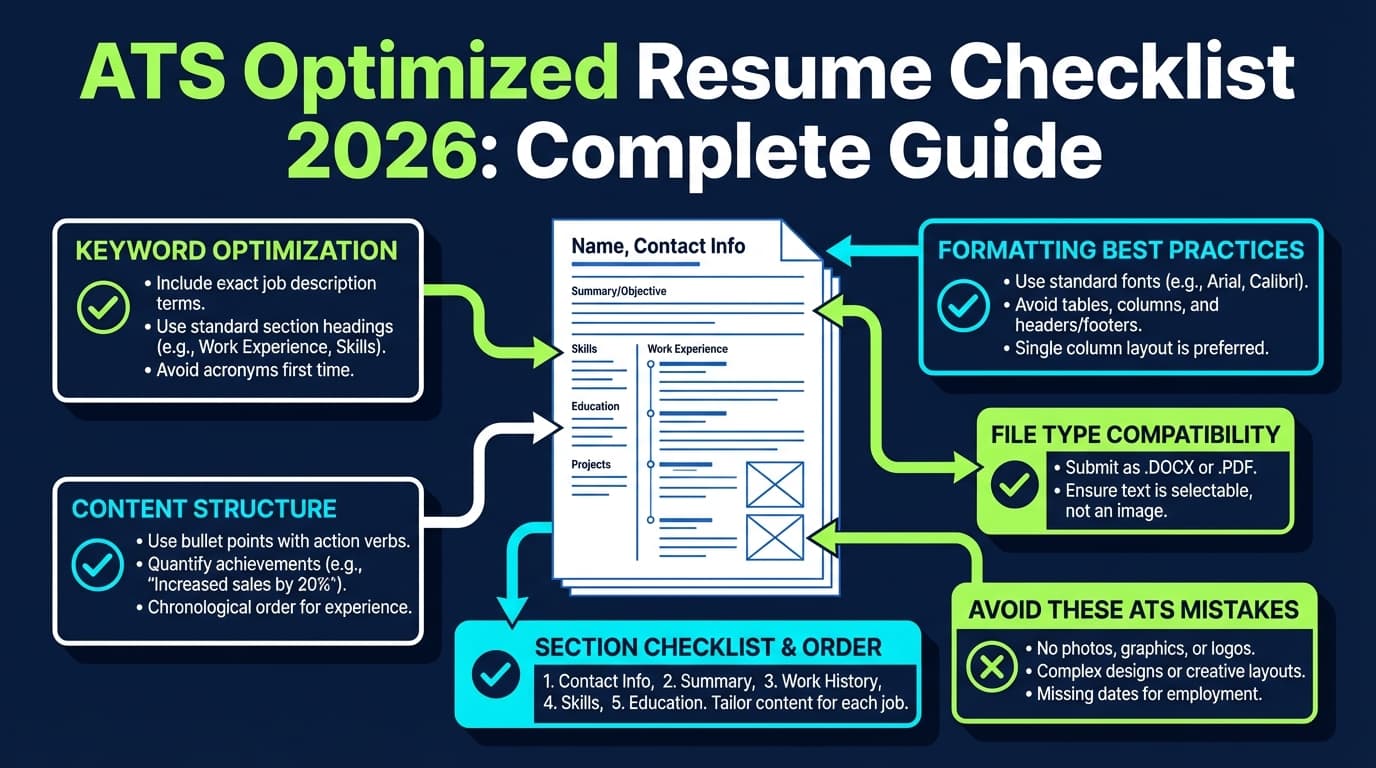
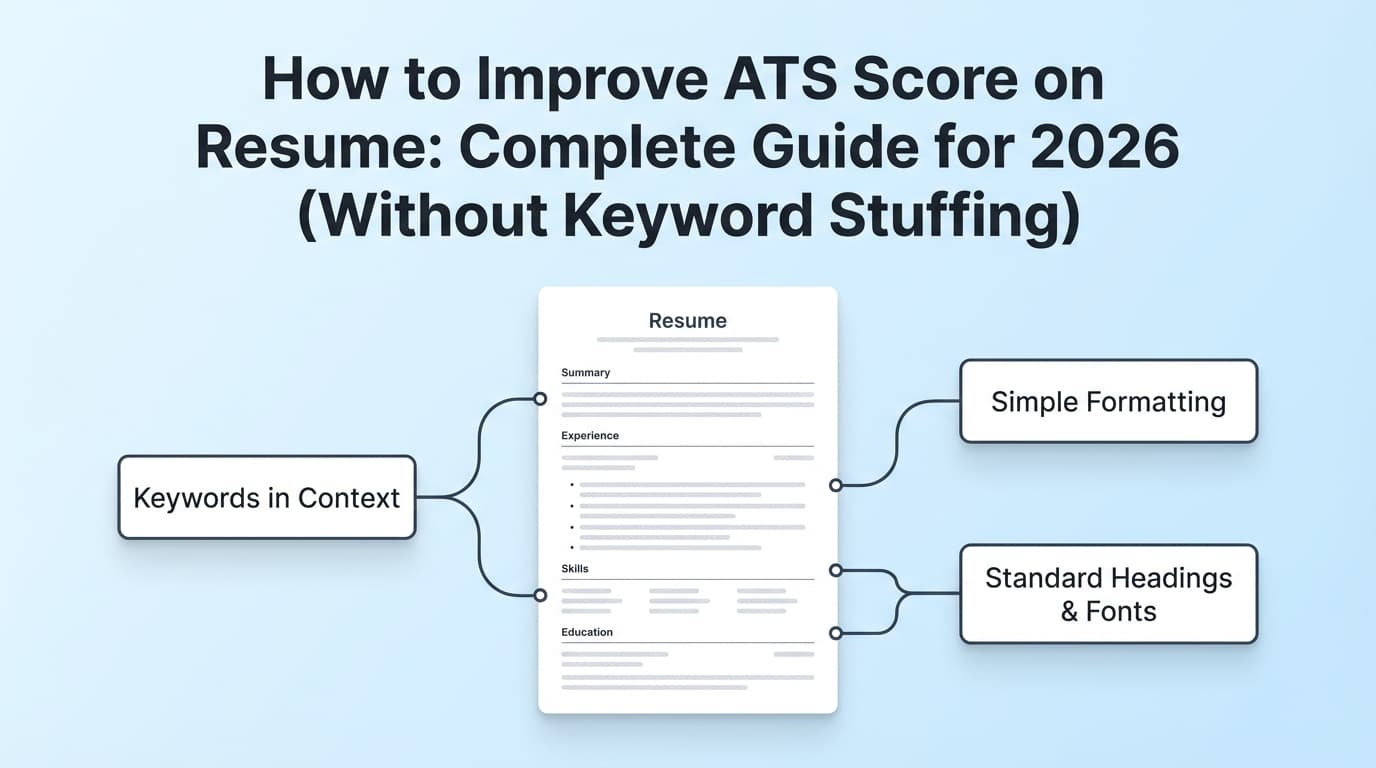
Step 1: Start with an ATS-safe structure (single column + standard headings)
Before you touch keywords, lock in a structure that parsers handle well:
Use standard headings (examples):
- Summary
- Skills
- Work Experience (or Professional Experience)
- Education
- Certifications (optional)
- Projects (optional)
Columbia Career Education explicitly recommends using common names for section headers (e.g., Education, Work Experience, Skills). (Confidence: High — university guidance: https://www.careereducation.columbia.edu/resources/optimizing-your-resume-applicant-tracking-systems)
Avoid (or use carefully):
- Two-column layouts
- Tables, text boxes, graphics
- Icons in place of words (phone/email/LinkedIn icons)
- Headers/footers that contain key info (some systems ignore them)
Pro tip: If you love a “designed” resume, keep it for networking (emailing a hiring manager directly). For ATS uploads, prioritize extraction reliability. (Confidence: High — consistent across multiple career guidance sources, including UIC/Columbia.)
Step 2: Run the “2-minute ATS parsing test” (before optimizing keywords)
Do this before you change content—otherwise you might chase the wrong problem.
ATS parsing test A (copy/paste test):
- Open your resume PDF.
- Select all text.
- Paste into a plain-text editor (Notepad/TextEdit).
- Check:
- Does it paste in the correct reading order?
- Are headers recognizable?
- Are dates attached to the right roles?
- Are bullets intact?
If the paste is scrambled, your ATS score will likely stay low no matter how good your keywords are.
ATS parsing test B (application preview test):
If a job portal shows a “preview” or auto-filled fields after upload, check whether:
- Work history parses correctly
- Skills are detected
- Education appears cleanly
Step 3: Extract keywords from the job description (the right way)
Most people do keyword matching wrong by dumping every repeated word into Skills.
Instead, extract keywords into four buckets:
- Role titles & seniority (e.g., “Data Analyst,” “Senior Product Manager”)
- Hard skills / tools (e.g., SQL, Excel, Python, Tableau, GA4)
- Domain keywords (e.g., B2B SaaS, ETL, demand gen, SOC 2)
- Responsibilities / verbs (e.g., “build dashboards,” “forecast,” “stakeholder management”)
How to extract quickly (manual method):
- Highlight anything that looks like:
- A required tool
- A core responsibility
- A deliverable
- A metric
- Then prioritize:
- “Required” > “Preferred”
- Repeated terms > one-offs
- Tools you truly used > tools you barely touched
Pro tip: Don’t skip “small” keywords like specific platforms (Jira, Salesforce, Workday, HubSpot). They can be filter terms.
Step 4: Add keywords where they count (without stuffing)
ATS scanners tend to reward keywords that appear in high-signal sections:
- Title + Summary
- Skills
- Work Experience bullets
- Projects
Your goal: get keywords into context, not just lists.
Where to place keywords (practical rules)
Rule 1: Put 60–70% of your keywords into bullets.
Why: it proves the keyword is real.
Rule 2: Use the exact term at least once.
Example:
- Job says “data visualization”
- You wrote “visualize data”
Include the exact phrase “data visualization” at least once (truthfully). (Confidence: Medium — many ATS scanners do literal matching; exact matching is frequently recommended in ATS keyword guidance, e.g., Columbia encourages “exact phrases”: https://www.careereducation.columbia.edu/resources/optimizing-your-resume-applicant-tracking-systems)
Rule 3: Don’t list skills you can’t defend in an interview.
Keyword alignment helps you get seen, but credibility gets you hired.
Step 5: Rewrite your bullets to increase match + impact
A strong ATS bullet does 3 things:
- Uses a relevant verb
- Includes a keyword/tool
- Shows scope + result
ATS-friendly bullet formula
Action + What you did + Tool/keyword + Why it mattered + Result (metric)
Before (weak):
- Worked on dashboards and reporting.
After (ATS-friendly + human-friendly):
- Built weekly Tableau dashboards to track funnel conversion by channel, helping marketing reallocate spend and improve MQL-to-SQL conversion by 18%.
Notice: the keywords (“Tableau,” “dashboards,” “conversion”) appear naturally, and the result is measurable.
Pro tip: If you don’t have metrics, use scope:
- “for 12 stakeholders”
- “across 6 markets”
- “for a $2M portfolio”
- “on 40+ tickets/month”
Step 6: Fix your Skills section (most ATS scores rise here fastest)
A Skills section should be:
- Easy to parse
- Aligned to the job
- Not a dumping ground
Good ATS-friendly Skills example (Data Analyst):
Skills: SQL (PostgreSQL), Excel (PivotTables, XLOOKUP), Python (pandas), Tableau, A/B testing, cohort analysis, stakeholder management
Bad example:
Skills: Hard-working, go-getter, team player, communication, leadership, SQL, Python, Tableau, synergy
Keep soft skills mostly in bullets, where you can prove them.
Step 7: Choose the right file format (PDF vs DOCX)
This is situational because different systems parse differently, but many career resources say DOCX is often safer for parsing, while PDF preserves formatting (and modern ATS are better at PDFs than they used to be). (Confidence: Medium — common guidance across multiple career sites and discussions; see file format question trends and advice such as TopResume’s discussion: https://topresume.com/career-advice/what-is-an-ats-resume)
Practical rule:
- If the portal requests DOC/DOCX → use DOCX
- If it doesn’t specify and your PDF passes the copy/paste test → PDF is usually fine
- If your PDF fails the copy/paste test → switch to DOCX or fix formatting
Step 8: Align titles (without lying)
ATS and recruiters both scan for title alignment.
If your official title is unusual, use a clarifier:
Example:
- Growth Ninja (Growth Marketing Specialist)
- Software Engineer II (Backend)
- Client Partner (Account Manager)
This improves match without misrepresenting your employment. (Confidence: High — common resume best practice; ensure accuracy and transparency.)
Step 9: Tailor “just enough” (the 80/20 approach)
You don’t need to rewrite everything.
Focus on:
- Summary (2–3 lines)
- Skills (top 8–15 skills)
- The most recent 1–2 roles (adjust bullets to match the posting)
This is where ATS tools help—they show keyword gaps faster than manual scanning.
Step 10: Re-test your score and parsing (iterate once)
After edits:
- Re-run your scanner
- Re-check copy/paste order
- Make sure the resume still reads well to a human in <10 seconds
Remember: scores are directionally useful, not absolute truth. (Confidence: High — different tools score differently; see reliability discussions like: https://www.reddit.com/r/resumes/comments/1exryzc/are_ats_checkers_reliable_short_answer_is_no/)
What is a “good” ATS score (and when to stop optimizing)?
Different tools recommend different targets, but Jobscan states they generally recommend an 80% match rate, and note many users see success around 75%. (Confidence: Medium — vendor guidance; still not universal across ATS: https://www.jobscan.co/blog/what-jobscan-match-rate-should-i-aim-for/)
Use this practical framework:
- <60%: You likely have major keyword or structure gaps.
- 60–75%: Competitive if your experience is strong and resume reads well.
- 75–85%: Strong alignment; shift focus to networking + application volume/quality.
- 85%+: Good—but don’t chase 100% at the expense of readability and truthfulness.
Stop optimizing when:
- Your formatting parses cleanly
- Your top keywords appear naturally (summary + skills + bullets)
- Your resume tells a coherent story for the role
12 best practices to improve ATS score (without harming readability)
-
Use a single-column layout
Many ATS issues come from columns/tables scrambling reading order. (Confidence: High — consistent career center guidance; see UIC PDF checklist: https://careerservices.uic.edu/wp-content/uploads/sites/26/2017/08/Ensure-Your-Resume-Is-Read-ATS.pdf) -
Use standard section headings (Work Experience, Education, Skills)
(Confidence: High — Columbia guidance: https://www.careereducation.columbia.edu/resources/optimizing-your-resume-applicant-tracking-systems) -
Repeat the exact keyword at least once (if true)
Especially for tools and certifications. -
Put keywords in context (bullets), not only in Skills
(Confidence: High — improves credibility for humans and relevance for keyword scanners.) -
Match the job title (with a clarifier if needed)
Helps both ATS and the recruiter’s skim. -
Front-load relevance
Put the most relevant role/bullets higher; recruiters skim top-down. (Confidence: High — supported by eye-tracking emphasis on quickly visible info: The Ladders study.) -
Use consistent date formats
Example:Jan 2023 – Oct 2025everywhere. -
Avoid graphics, icons, and “rating bars” for skills
Many systems can’t parse them reliably. (Confidence: High — common ATS formatting guidance across multiple sources.) -
Use simple fonts and standard characters
Avoid fancy symbols that become gibberish when parsed. -
Quantify impact where possible
Metrics help human review in seconds. -
Use acronyms + spelled-out terms when relevant
Example: “Customer Relationship Management (CRM)” once, then CRM. -
Keep it honest
ATS optimization is about clarity + alignment, not tricking a system.
Common ATS score mistakes to avoid
Mistake 1: Keyword stuffing
Stuffing a Skills section with 40 tools you barely used can raise a scanner score but lower interview conversion (and can backfire in interviews). (Confidence: High — broadly accepted; see keyword stuffing warnings like Jobscan: https://www.jobscan.co/blog/resume-keyword-stuffing/)
Fix: Keep Skills tight and prove key tools in bullets.
Mistake 2: Using a two-column resume that parses out of order
You might think it looks “clean,” but if the ATS reads the left column top-to-bottom and then the right column, your story becomes nonsense.
Fix: Use one column for ATS submissions or ensure your export preserves reading order.
Mistake 3: Hiding critical keywords in headers/footers
Some ATS systems ignore headers and footers entirely.
Fix: Put your name/contact info in the main body at the top.
Mistake 4: “Creative” headings
- “Where I’ve Made Impact” instead of “Work Experience”
- “Toolbox” instead of “Skills”
Fix: Use standard headings first. Creativity belongs in your portfolio, not your parsing.
Mistake 5: Over-optimizing for one scanner
If one tool says 92 and another says 54, that doesn’t mean your resume suddenly got worse—it means the scoring models differ. (Confidence: Medium — common reality across scanners; see discussions of inconsistent scoring: https://www.reddit.com/r/resumes/comments/1exryzc/are_ats_checkers_reliable_short_answer_is_no/)
Fix: Use scanners for direction, then prioritize real-world clarity and match.
ATS-friendly resume examples (copy/paste templates)
Example: ATS-friendly Summary (Project Manager)
Summary
Project Manager with 6+ years leading cross-functional delivery for SaaS and internal operations teams. Experienced in Agile ceremonies, stakeholder management, and roadmap execution. Delivered process improvements that reduced cycle time by 22% and improved on-time delivery across 3 teams.
Example: ATS-friendly Work Experience bullet set (Software Engineer)
- Built and maintained REST APIs in Node.js and PostgreSQL, supporting 120K+ monthly active users and reducing p95 latency by 35%.
- Implemented CI/CD with GitHub Actions and Docker, cutting deployment time from 45 minutes to 10 minutes.
- Partnered with product and design to ship 8 customer-facing features; improved activation rate by 12% via onboarding flow updates.
Example: ATS-friendly Skills section (Marketing)
Skills: GA4, Google Tag Manager, Looker Studio, Excel, SEO, paid search, lifecycle email, A/B testing, attribution, HubSpot, stakeholder management
A fast 30-minute ATS score improvement plan (for high-volume applicants)
If you’re applying a lot, you need a workflow that doesn’t consume your life.
Minute 0–5: Fix format + headings
- One column
- Standard headings
- Check paste order
Minute 5–15: Keyword extract + shortlist (10–20 terms)
- Pull tools, must-haves, and core responsibilities
- Prioritize “Required” items
Minute 15–25: Update Summary + Skills
- Add the exact job title (truthfully)
- Add missing top skills you actually have
Minute 25–30: Update 3–5 bullets
- Add the most important missing keywords into real accomplishments
Then apply.
Tools to help improve ATS score (honest, non-hype)
JobShinobi (Resume analysis + job match + LaTeX resume builder)
JobShinobi is built around “stop getting rejected by ATS” positioning and includes:
- AI resume analysis with scoring and detailed feedback (including ATS-focused categories). (Confidence: High — supported by product documentation/report constraints.)
- Job matching: compare your resume to a job description or job URL (via extraction) and identify keyword gaps. (Confidence: High — supported by product report constraints.)
- LaTeX resume templates + editor + PDF compilation to keep formatting consistent. (Confidence: High — supported by product report constraints.)
- AI resume editing agent to help rewrite content and iterate. (Confidence: High — supported by product report constraints.)
Where it fits in this guide: after you’ve chosen an ATS-safe structure, JobShinobi can help you identify missing keywords, tighten bullets, and iterate quickly instead of guessing.
Internal links (product navigation):
- Resume area:
/dashboard/resume - Job tracker:
/dashboard/job-tracker
Pricing note: JobShinobi Pro is $20/month or $199.99/year. The pricing UI mentions a 7‑day free trial, but trial mechanics aren’t clearly verified in code, so treat trial availability as dependent on the current billing setup. (Confidence: High for pricing; Medium for trial mention.)
Subscription path: /subscription
Other tools you’ll see in ATS optimization
- Jobscan (resume-to-job match rate tool) — useful for gap spotting and match-rate targets (their guidance mentions ~80% as a general aim). (Confidence: Medium — vendor guidance: https://www.jobscan.co/blog/what-jobscan-match-rate-should-i-aim-for/)
- Resume Worded / Enhancv / other scanners — helpful for second opinions, but scores vary by tool. (Confidence: High — common behavior across scanners; use as directional feedback.)
Pro tip: If tools disagree, trust:
- parsing accuracy, 2) relevance, 3) readability—over the number.
FAQ (People Also Ask–style)
How do I increase my ATS resume score?
Focus on three levers: clean parsing (single column, standard headings), keyword alignment to the job description, and proof in bullets (metrics + tools + results). Run a quick copy/paste parsing test and then iterate your Summary, Skills, and top bullets.
Why is my ATS score so low?
Common causes are: (1) formatting that breaks parsing (tables/columns/text boxes), (2) missing role-specific keywords (tools, titles, certifications), or (3) keywords listed without context (stuffing). Start by diagnosing parsing, then fix relevance.
What is a good ATS score for a resume?
There’s no universal standard because scanners differ. Some tools recommend aiming around 75–80%+ as a directional benchmark, but treat it as guidance, not a guarantee. (Confidence: Medium — Jobscan recommends ~80% generally: https://www.jobscan.co/blog/what-jobscan-match-rate-should-i-aim-for/)
Can ATS read resumes with columns?
Sometimes, but columns increase the risk that text is read in the wrong order. If your pasted text is scrambled, your ATS parsing is likely breaking—switch to a single-column layout for ATS submissions. (Confidence: High — consistent guidance across career centers like UIC/Columbia.)
Is a PDF OK for ATS?
Often yes—if the PDF is text-based (not an image) and passes the copy/paste test in the correct order. If the employer requests DOCX, follow their instructions. (Confidence: Medium — parsing varies by system; test your specific file.)
Should I use DOCX or PDF for ATS?
If the system requests DOCX, use DOCX. If it doesn’t specify, use the version that parses cleanly in tests and preserves readability. Many resources suggest DOCX can be safer for older parsers, while PDF preserves formatting better. (Confidence: Medium — common guidance; exact result depends on the ATS.)
Do ATS resume scores actually matter?
They can be useful as a debugging tool (to find missing keywords and formatting issues), but they don’t represent every employer’s ATS configuration. Use scores to improve clarity and match—then focus on real hiring levers (portfolio, networking, referrals, targeted applications). (Confidence: High — ATS configurations vary; scoring is not standardized.)
Key takeaways
- Improve ATS score by fixing parsing first, then keywords, then bullet credibility.
- Use standard headings, one column, and a simple structure that survives text extraction.
- Tailor quickly: Summary + Skills + top 3–5 bullets for each role.
- Don’t chase 100%. Use ATS scores as directional feedback, not truth.
- Tools like JobShinobi can speed up iteration through resume analysis, job matching, and guided rewrites—without guessing.