Recruiters don’t “read” your resume the way you do. They skim it—fast. One widely cited eye-tracking study found recruiters spend about 7.4 seconds on an initial resume screen, and simple, clearly sectioned layouts performed better in that scan pattern. (Source: The Ladders eye-tracking report PDF; also summarized by HR Dive: https://www.theladders.com/static/images/basicSite/pdfs/TheLadders-EyeTracking-StudyC2.pdf and https://www.hrdive.com/news/eye-tracking-study-shows-recruiters-look-at-resumes-for-7-seconds/541582/)
At the same time, your resume often enters a database first. Jobscan reports detecting an ATS for 97.8% of Fortune 500 companies in its 2025 ATS Usage Report. (Source: https://www.jobscan.co/blog/fortune-500-use-applicant-tracking-systems/)
So the real question isn’t “ATS optimized resume vs recruiter friendly resume—which one should I write?”
It’s this:
How do you write a resume that is machine-readable and persuasive to a human in under 10 seconds?
In this guide, you’ll learn:
- What “ATS-optimized” and “recruiter-friendly” actually mean (and what people get wrong)
- A practical framework for balancing ATS parsing, keyword matching, and human readability
- A step-by-step process (with examples) to turn one resume into a “dual-audience” resume
- The most common mistakes that break parsing or hurt your credibility
- Tools that can help you test, tailor, and track applications without losing your mind
What is an ATS-optimized resume?
An ATS-optimized resume is a resume written and formatted to work well inside an Applicant Tracking System (ATS). In plain language, it’s designed so an ATS can:
- Parse it correctly (extract your name, title, dates, employers, skills)
- Index it correctly (store it under the right fields)
- Retrieve it correctly (show you when a recruiter searches for “SQL + Tableau”)
- Match it to a role (keyword alignment with job requirements)
An ATS-optimized resume is not automatically “robotic.” The best ones are clean, readable, and keyword-aligned—because those traits also help humans.
Key characteristics of ATS optimization:
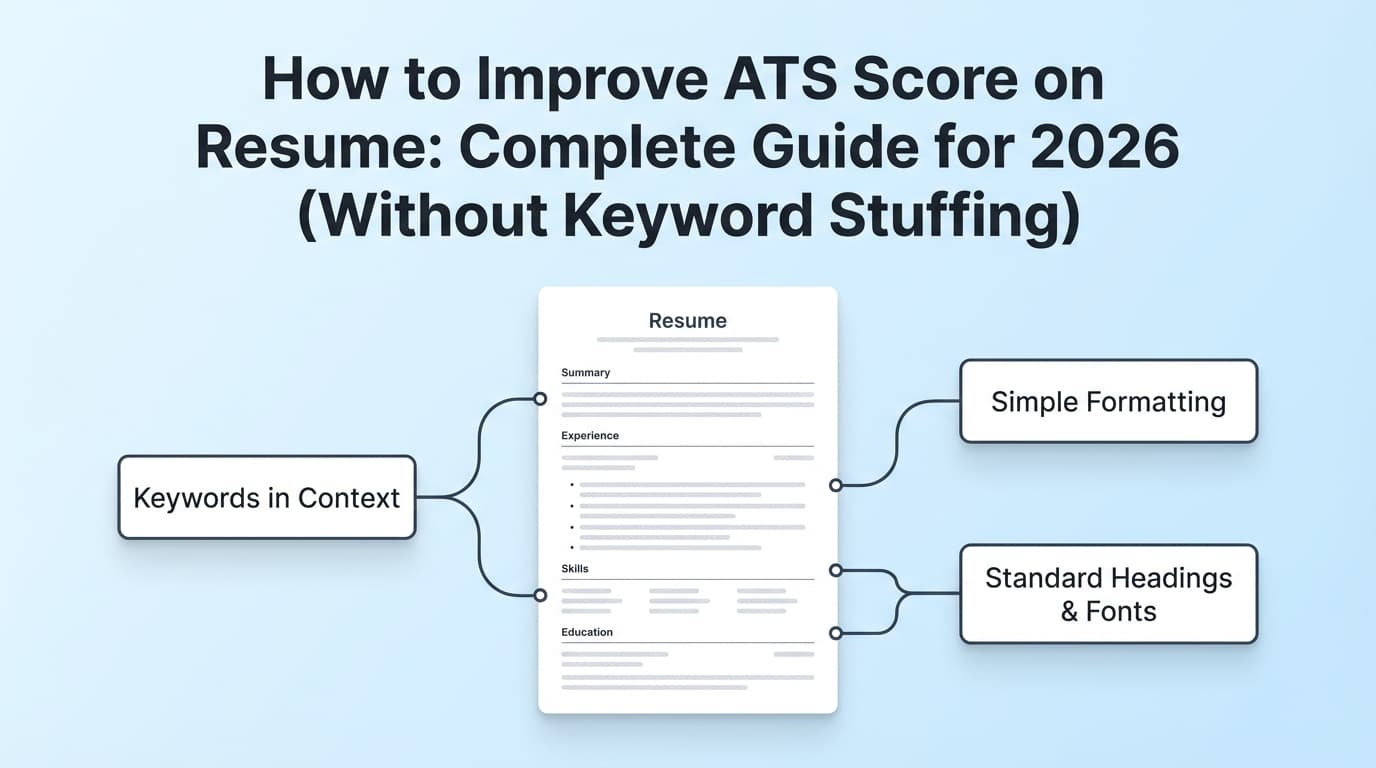
- Simple structure (clear headings, consistent dates)
- Standard section labels (e.g., “Work Experience,” “Skills,” “Education”)
- No fragile formatting that scrambles text order (columns, tables, text boxes)
- Keyword alignment with the specific job description (without stuffing)
What is a recruiter-friendly resume?
A recruiter-friendly resume is a resume optimized for how humans actually evaluate candidates—quickly.
It helps a recruiter answer, almost instantly:
- What role are you targeting?
- Are you qualified (based on relevant skills + experience)?
- What impact did you have (metrics, outcomes, scope)?
- Is this easy to follow and trust?
Career centers often emphasize clarity, scannability, and good use of whitespace for readability. For example, Harvard’s career guidance stresses making it easy to read and follow, balancing text with whitespace. (Source: https://careerservices.fas.harvard.edu/resources/create-a-strong-resume/)
Key characteristics of recruiter friendliness:
- Clear “target role” signal near the top (headline/summary)
- Fast proof (top skills + most relevant experience first)
- Strong bullets (action + scope + result)
- Clean visual hierarchy (consistent spacing, bolding where it helps)
ATS optimized vs recruiter friendly: the real difference (and the trap)
Here’s the simplest way to think about it:
- ATS-optimized = “Can the system read, store, and find my resume accurately?”
- Recruiter-friendly = “Can a human understand and trust my value quickly?”
The trap: over-optimizing for one audience
Most job seekers fall into one of two failure modes:
Failure mode #1: “ATS-only” resumes
These often have:
- Keyword lists with no context
- Generic, repetitive wording
- Bullets that read like a job description pasted in
Result: You might parse fine, but you don’t persuade anyone.
Failure mode #2: “Design-first” resumes
These often use:
- Two columns
- Icons
- Text boxes
- Fancy section dividers
Result: They may look great… until the ATS scrambles your skills and dates into nonsense.
Jobscan explicitly notes ATS can’t read tables/columns reliably. (Source: https://www.jobscan.co/blog/resume-tables-columns-ats/)
The goal: a “dual-audience” resume
A dual-audience resume is both:
- Parsable (machine readable)
- Searchable (keyword aligned)
- Skimmable (human readable)
- Credible (impact demonstrated with evidence)
Why this matters in 2026 (statistics + trends)
Hiring tech isn’t slowing down—and it’s not only ATS anymore.
1) ATS use is widespread in large employers
Jobscan’s ATS Usage Report says it detected an ATS for 97.8% of Fortune 500 companies in 2025.
Source: https://www.jobscan.co/blog/fortune-500-use-applicant-tracking-systems/
Confidence: High (primary source report + widely cited)
2) Recruiters are using AI tools—but don’t fully trust them
MyPerfectResume’s 2024 survey reports:
- 96% of recruiters use AI recruiting tools
- Only 35% believe those tools are “very effective” at identifying the right candidates
Source: https://www.myperfectresume.com/career-center/jobs/search/recruiting-trends
Confidence: Medium (survey via MyPerfectResume; still useful directional data)
3) Employers are increasingly using AI to screen resumes/applicants
iHire’s 2025 State of Online Recruiting report says:
- 32.1% of employers who use AI leverage it to screen applicants and resumes, up from 11.6% in 2024.
Source: https://www.ihire.com/resourcecenter/employer/pages/the-state-of-online-recruiting-2025
Confidence: Medium (survey-based, but clearly sourced and time-comparable)
4) Recruiters skim fast—so readability is not optional
The Ladders eye-tracking report found recruiters spend ~7.4 seconds on an initial screen.
Sources:
- PDF: https://www.theladders.com/static/images/basicSite/pdfs/TheLadders-EyeTracking-StudyC2.pdf
- Summary: https://www.hrdive.com/news/eye-tracking-study-shows-recruiters-look-at-resumes-for-7-seconds/541582/
Confidence: High (primary PDF + reputable summary)
5) You can self-test “parsability” quickly
MIT CAPD recommends a simple test: save your resume as a plain text (.txt) file to see whether key info survives.
Source: https://capd.mit.edu/resources/make-your-resume-ats-friendly/
Confidence: High (university career office guidance)
How to write a resume that’s both ATS-optimized and recruiter-friendly (step-by-step)
Step 1: Start with a clean, ATS-safe foundation (format first)
Before you touch keywords, make sure your resume won’t break parsing.
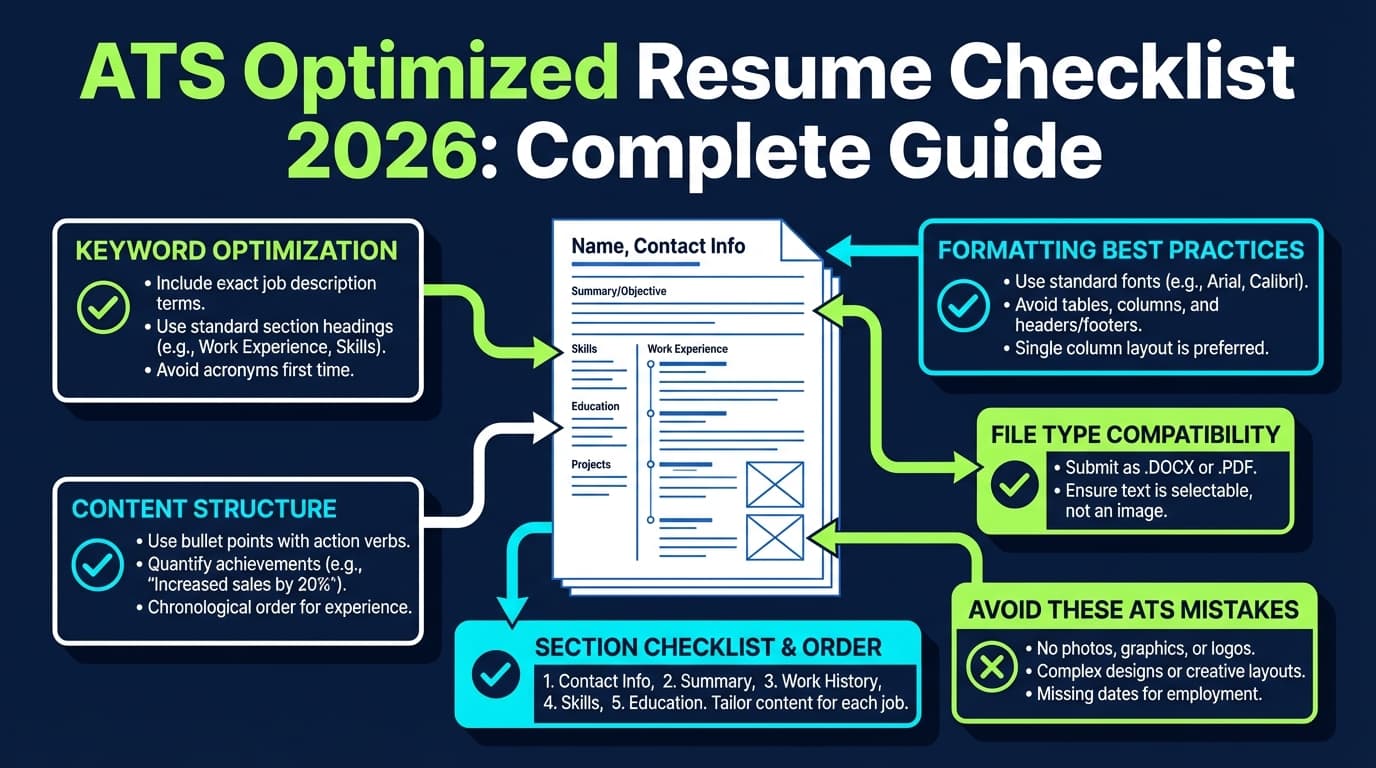
ATS-safe formatting checklist
- Use a single-column layout
- Avoid tables, text boxes, sidebars, and heavy graphics (these can reorder your content)
- Keep headings standard: Summary, Skills, Experience, Education
- Use consistent date formatting (e.g.,
May 2022 – Dec 2024)
Pro tip: Put contact info in the main body—not in headers/footers. Some guidance warns headers/footers can be skipped or parsed inconsistently. (Source example: UIC career services PDF: https://careerservices.uic.edu/wp-content/uploads/sites/26/2017/08/Ensure-Your-Resume-Is-Read-ATS.pdf)
Confidence: Medium (older PDF; still commonly recommended across modern resume guidance)
Step 2: Decide your “human skim path” (the 10-second plan)
Recruiters skim in patterns. Your resume should guide their eyes.
A strong top-third structure:
- Name + title/headline
- 1–3 line summary (role + strengths + domain)
- Skills (job-relevant and specific)
- First experience entry that proves you can do the job
Example headline
Data Analyst | SQL • Tableau • Stakeholder Reporting | Experimentation & KPI Dashboards
This is recruiter-friendly and ATS-friendly because it uses real keywords in context.
Step 3: Build a keyword map from the job description (without stuffing)
ATS optimization is less about “keyword hacks” and more about alignment.
How to extract keywords fast
-
Paste the job description into a doc
-
Highlight:
- Tools/tech (e.g., Python, Salesforce, Workday)
- Core skills (e.g., stakeholder management, forecasting)
- Role language (e.g., “cross-functional,” “roadmap,” “OKRs”)
- Must-haves (years, certifications, frameworks)
-
Group them into:
- Hard skills
- Role-specific nouns (deliverables like “dashboards,” “SOPs,” “pipeline”)
- Soft skills (only keep those the JD emphasizes)
- Industry terms (compliance, regulations, methodologies)
Rule: If a keyword appears in the JD and you genuinely have it, include it—but attach it to proof (a bullet, a project, a tool used).
Step 4: Place keywords where recruiters (and ATS) expect them
Put keywords in high-signal zones:
- Headline / target title
- Skills section (exact tool names)
- Most recent role bullets
- Projects (if applicable)
- Certifications (if required)
Avoid: dumping a long “Keyword Bank” section. That can look like gaming and doesn’t help recruiters trust you.
Keyword stuffing and “hidden text” tricks (like white-font keywords) are widely discouraged and can backfire. (Source example: Jobscan discussion of keyword stuffing/hidden keywords: https://www.jobscan.co/blog/resume-keyword-stuffing/)
Confidence: Medium (can’t verify how every ATS reacts, but it’s a credible caution and an obvious trust-killer for humans)
Step 5: Rewrite bullets for impact (this is where recruiter-friendly wins)
A recruiter-friendly bullet has:
- Action + scope + result
- The same vocabulary as the role (when honest)
- Metrics whenever possible
Weak bullet (generic)
- “Responsible for reporting and dashboards.”
Strong bullet (dual-audience)
- “Built weekly KPI dashboards in Tableau using SQL queries, reducing manual reporting time by 35% and improving stakeholder visibility across 4 teams.”
Same skills, but now it’s proof-based and skimmable.
Pro tip: If you don’t have metrics, use reasonable proxies:
- volume (
processed 200+ tickets/week) - latency (
cut onboarding time from 10 days to 6) - scope (
supported 12-person sales team) - quality (
reduced error rate by X%,improved uptime)
Step 6: Run a “parsability test” (2-minute check)
Use at least one of these:
-
Plain text (.txt) test (MIT CAPD recommendation)
Save your resume as.txtand confirm:- Contact info remains visible
- Job titles and companies are intact
- Bullets don’t collapse into gibberish
Source: https://capd.mit.edu/resources/make-your-resume-ats-friendly/
-
Copy/paste test into a plain text editor If content order breaks, your formatting is too complex.
-
ATS scanner tools (helpful, but don’t worship the score) Use these to find missing keywords and formatting issues—but don’t chase “100% match” at the cost of readability.
Step 7: Tailor efficiently (keep versions organized)
If you’re applying to multiple roles, you need a system for:
- A master resume
- Tailored versions per job family (e.g., “Data Analyst – Product” vs “Data Analyst – Ops”)
- Highly tailored versions for top priority roles
This is where many job seekers burn out—especially in high-volume applying.
Quick decision table: ATS-optimized vs recruiter-friendly
| Resume element | ATS-optimized focus | Recruiter-friendly focus | Best balance |
|---|---|---|---|
| Layout | Single column, simple | Clean, skimmable | Single column + strong whitespace |
| Headings | Standard labels | Clear sections | Standard labels with strong hierarchy |
| Keywords | Match JD terminology | Natural phrasing | Use keywords inside proof bullets |
| Bullets | Parsable text | Results + metrics | Action + metric + relevant keyword |
| Design | Minimal | Professional | Minimal design, maximum clarity |
| File type | Compatibility | Looks consistent | Use what the application requests; test parsing |
12 best practices for a “dual-audience” resume
-
Use a single-column layout
Many ATS parsing issues come from columns/tables. (Jobscan notes tables/columns aren’t reliably read.)
Source: https://www.jobscan.co/blog/resume-tables-columns-ats/ -
Use standard section headings
Example: Work Experience, Education, Skills. (Also echoed by major career sites like Indeed.)
Source (example SERP guidance): https://www.indeed.com/career-advice/resumes-cover-letters/ats-resume-template
Confidence: Medium (page sometimes gated by 403 tools; widely consistent advice) -
Put the target job title near the top
Recruiters decide fit quickly. Make the match obvious. -
Front-load the most relevant experience
If your best match is not your latest role, add a “Relevant Experience” or “Selected Projects” section—still ATS-safe, but recruiter-smart. -
Write skill bullets, not task bullets
Task: “Handled reporting.”
Skill + impact: “Automated reporting pipeline…” -
Mirror the job description’s nouns (honestly)
If the JD says “stakeholder management,” and you do that, use the phrase. -
Avoid keyword stuffing
It can read as dishonest and may harm clarity. (See keyword stuffing cautions.)
Source: https://www.jobscan.co/blog/resume-keyword-stuffing/ -
Use simple bullet symbols
Avoid stars/checkboxes/unique icons that can turn into odd characters.
(Example guidance appears in Jobscan/TopResume and other resume formatting guides.)
Source example: https://topresume.com/career-advice/what-is-an-ats-resume -
Keep dates consistent
Inconsistent date formats can confuse parsers and humans. -
Use a “Skills” section that’s specific
Better:SQL (CTEs, window functions), Tableau (dashboards), Python (pandas)
Worse:Data, Analytics, Teamwork -
Use whitespace strategically
Readability matters in quick scans; avoid dense walls of text.
Source: Harvard resume guidance emphasizes balancing whitespace for readability: https://careerservices.fas.harvard.edu/resources/create-a-strong-resume/ -
Test before you submit
Do the.txttest (MIT) and a quick copy/paste check.
Source: https://capd.mit.edu/resources/make-your-resume-ats-friendly/
Common mistakes to avoid (and how to fix them)
Mistake 1: Two-column templates that scramble text order
Why it’s a problem: ATS may read across columns in unexpected order (skills mixed into experience, dates detached).
Fix: Use a single-column template; if you need space, tighten spacing and prioritize relevance.
Mistake 2: Contact info in headers/footers
Why it’s a problem: Some parsing workflows skip header/footer content.
Fix: Put contact info at the top of the main body.
Mistake 3: Keyword stuffing (or “white text” hacks)
Why it’s a problem: It destroys trust and can create nonsense resumes.
Fix: Put keywords inside real bullets that demonstrate the skill.
Mistake 4: Generic summaries that don’t match the role
Why it’s a problem: Even if your resume “passes ATS,” recruiters don’t see role fit quickly.
Fix: Tailor the headline + summary to the job family.
Mistake 5: Chasing an “ATS score” instead of job-fit evidence
Why it’s a problem: A score doesn’t interview—proof does.
Fix: Use tools to find gaps, then add context-rich evidence (projects, impact bullets).
Example: ATS-heavy vs recruiter-friendly (and the balanced version)
Example 1: Skills section
ATS-heavy (looks like gaming)
Skills: Python Python Python SQL SQL SQL Tableau Tableau Stakeholder Management Stakeholder Management
Recruiter-friendly but vague
Skills: Data analysis, communication, teamwork, reporting
Balanced
Skills: SQL (joins, CTEs), Tableau (dashboards), Python (pandas), A/B testing, stakeholder reporting, KPI design
Example 2: Experience bullet
ATS-heavy (keyword dump)
“Used SQL, Tableau, dashboards, reporting, stakeholders, analytics, insights…”
Recruiter-friendly but light on keywords
“Created dashboards to share insights with leadership.”
Balanced
“Built executive-ready Tableau dashboards powered by SQL queries, improving weekly KPI visibility and reducing manual reporting effort by 30%.”
Tools to help with ATS optimization (without sacrificing recruiter readability)
A few honest tool categories—each with tradeoffs:
1) Resume scanners / match tools
Useful for:
- Finding missing keywords
- Spotting formatting risks
- Comparing resume vs job description
Examples:
- Jobscan (scanner + formatting resources)
- Resume Worded (scanner-style feedback)
- Rezi (ATS parse troubleshooting content)
2) Job tracking tools (to stay consistent)
If you’re applying broadly, organization impacts outcomes: follow-ups, interview loops, response rate patterns.
3) JobShinobi (resume + matching + tracking workflow)
JobShinobi is built around two problems job seekers complain about constantly:
- “Is my resume actually ATS-friendly and tailored?”
- “How do I track everything without living in spreadsheets?”
What JobShinobi supports (accurate, evidence-based):
- LaTeX resume builder with an in-app editor and PDF preview/compilation (LaTeX → PDF)
- AI resume analysis with ATS-focused scoring and feedback
- Job description extraction (from URL or pasted text) and resume-to-job matching analysis
- Resume version history so you can keep tailored versions organized
- Job application tracking, including an email-forwarding workflow that can parse job-related emails into your tracker (job application email parsing is Pro-gated)
Pricing (don’t guess):
- JobShinobi Pro is $20/month or $199.99/year.
- Site marketing copy mentions a 7-day free trial, but trial enforcement isn’t clearly verifiable in code—so treat that as “mentioned,” not guaranteed.
Where it fits in this guide:
Use it as a workflow hub when you’re tailoring multiple resume versions and want both a resume analysis + job match view, plus application tracking in one place.
Internal links (may require login):
- Resume area:
/dashboard/resume - Job tracker:
/dashboard/job-tracker - Login:
/login - Subscription:
/subscription
Key takeaways
- An ATS-optimized resume is about parsing + keyword retrieval; a recruiter-friendly resume is about clarity + proof.
- The best resumes are dual-audience: simple formatting, standard headings, and keyword alignment inside impact bullets.
- Don’t chase an “ATS score” at the expense of readability—recruiters skim fast (7.4 seconds is a useful benchmark).
- Test your resume: do a
.txtplain-text check and confirm content order is intact. - Build a sustainable tailoring system (versions + tracking), not a one-off resume you never update.
FAQ
What does “ATS optimized resume” mean?
It means your resume is formatted and written so an Applicant Tracking System can parse it accurately (extract sections, dates, titles) and match it to job requirements via keywords. It should still read naturally to a human.
What is the difference between an ATS-friendly resume and a recruiter-friendly resume?
- ATS-friendly focuses on machine readability and correct parsing.
- Recruiter-friendly focuses on fast human comprehension, relevance, and credible impact. The best resume is both.
What should I avoid for an ATS-friendly resume?
In general, avoid:
- Two-column layouts, tables, and text boxes (can scramble parsing)
- Icons and decorative graphics for key information
- Header/footer contact info
- Keyword stuffing or hidden text
Should I submit my resume as PDF or Word?
Follow the employer’s instructions first. If both are allowed, many guides say DOCX can be safer for parsing, while PDF preserves formatting—but only if the PDF is text-based and simply formatted. When in doubt, test your specific file by copy/paste and plain-text checks. (See discussions like Jobscan’s PDF vs Word guidance: https://www.jobscan.co/blog/resume-pdf-vs-word/ — note some automated tools may not fetch the page, but the guidance is widely echoed.)
Can ATS read a two-column resume?
Sometimes, but not reliably across systems. If your text order matters (it does), single-column is the safest default—especially for online applications.
Do recruiters actually read resumes, or does the ATS decide?
An ATS primarily stores and organizes candidates; recruiters still make human decisions. The risk is that a poorly formatted resume can be parsed badly, making you harder to find or evaluate—so you want both good parsing and strong human-readable content.
Is it smart to create two versions: one ATS and one “designed”?
For most applicants, one clean, well-structured resume works best everywhere. Some candidates keep a more designed version for networking or portfolio contexts, but your default submission resume should be ATS-safe and recruiter-readable.
What is a “good ATS score”?
There’s no universal score because ATS systems differ and many “scores” come from third-party scanners, not the employer’s system. Use scores directionally—to catch missing keywords and formatting issues—then prioritize clarity, relevance, and proof.