A lot of job seekers are applying for months, tailoring like crazy, and still hearing nothing—so it’s natural to ask:
“Does an AI powered resume builder work for ATS?”
It can—but only when you use it for the right parts of the problem.
Here’s the nuance most articles skip: ATS is usually not a cartoon “robot gatekeeper” that auto-rejects everyone. In a recruiter interview study published by Enhancv, 92% of recruiters said their ATS does not automatically reject resumes based on formatting/design/content; only 2 out of 25 recruiters (8%) reported using content-based auto-rejection thresholds (outside of knockout questions). (High confidence; source: https://enhancv.com/blog/does-ats-reject-resumes/)
So why do AI resume builders still matter? Because ATS does affect:
- how well your resume gets parsed into searchable fields,
- whether you show up for recruiter keyword searches,
- and whether your resume looks credible and relevant when a human finally reads it.
In this guide, you’ll learn:
- What it means for a resume builder to “work for ATS”
- Where AI helps (and where it backfires)
- A step-by-step workflow to use AI safely (with prompts)
- How to do a fast “ATS test” at home
- Best practices and common mistakes
- Tools to help (including an accurate, non-hype way to use JobShinobi)
What it means for an AI resume builder to “work for ATS”
When people say “pass ATS,” they usually mean one of these outcomes:
- Your resume parses cleanly (name, contact, job titles, dates, skills don’t get scrambled)
- You’re searchable (you appear when recruiters search for skills/tools/role terms)
- You don’t get filtered by requirements (knockout questions, required certifications, work authorization, etc.)
- You’re compelling to humans (because a human typically decides who gets interviews)
A resume builder “works for ATS” when it produces a document that’s:
- machine-readable,
- keyword-relevant,
- and human-credible.
What is an ATS (and what it isn’t)
An Applicant Tracking System (ATS) is hiring software used to collect applications, store candidate info, parse resumes, and help recruiters manage and search applicants.
A university career center description summarizes the reality job seekers face: many companies use an ATS, and your resume often goes through it before a human ever sees it. (High confidence; source: https://careers.tufts.edu/resources/everything-you-need-to-know-about-applicant-tracking-systems-ats/)
Why ATS matters in 2026
- Tufts Career Center cites that 98.4% of Fortune 500 companies use an ATS. (High confidence for the claim as stated on the university resource; source: https://careers.tufts.edu/resources/everything-you-need-to-know-about-applicant-tracking-systems-ats/)
- The ATS market is growing: MarketsandMarkets projects it will rise from $3.28B in 2025 to $4.88B by 2030 (CAGR 8.2%). (High confidence; source: https://www.marketsandmarkets.com/PressReleases/applicant-tracking-system.asp)
ATS isn’t going away—so the practical goal is: don’t make it harder for the ATS to understand you, and don’t make it easier for a human to dismiss you.
The ATS myth that creates the most anxiety: “75% get rejected by ATS”
You’ll see versions of “ATS rejects 75% of resumes” all over social media. The problem is that this number is often repeated without solid backing—and can mislead job seekers into obsessing over “beating bots” instead of showing proof of fit.
One useful corrective perspective: Davron explicitly notes the “75% rejected by ATS” figure is often cited without strong empirical evidence and explains why that framing is misleading. (Medium confidence; source: https://www.davron.net/ats-systems-explained-75-percent-resumes-rejected/)
And the Enhancv recruiter interview study is even more direct: most recruiters said the ATS isn’t auto-rejecting resumes by formatting/content in the way people fear. (High confidence; source: https://enhancv.com/blog/does-ats-reject-resumes/)
Takeaway: ATS can still hurt you via parsing/searchability/workflow, but you usually win by optimizing for clarity + relevance, not “gaming a robot.”
Does an AI powered resume builder work for ATS? The direct answer
Yes—often. But not automatically.
An AI resume builder can improve ATS outcomes when it helps you:
- keep formatting parsable (simple structure),
- match the job description’s terminology (keyword alignment),
- write clear impact bullets with real outcomes,
- remove ambiguity (titles, dates, section labels).
It can hurt you when it:
- produces generic “AI voice” (empty buzzwords),
- hallucinates skills/metrics,
- encourages keyword stuffing,
- uses templates that don’t parse cleanly,
- over-optimizes for a made-up “ATS score” instead of recruiter reality.
Where AI helps with ATS (and where it doesn’t)
Where AI helps most (high impact)
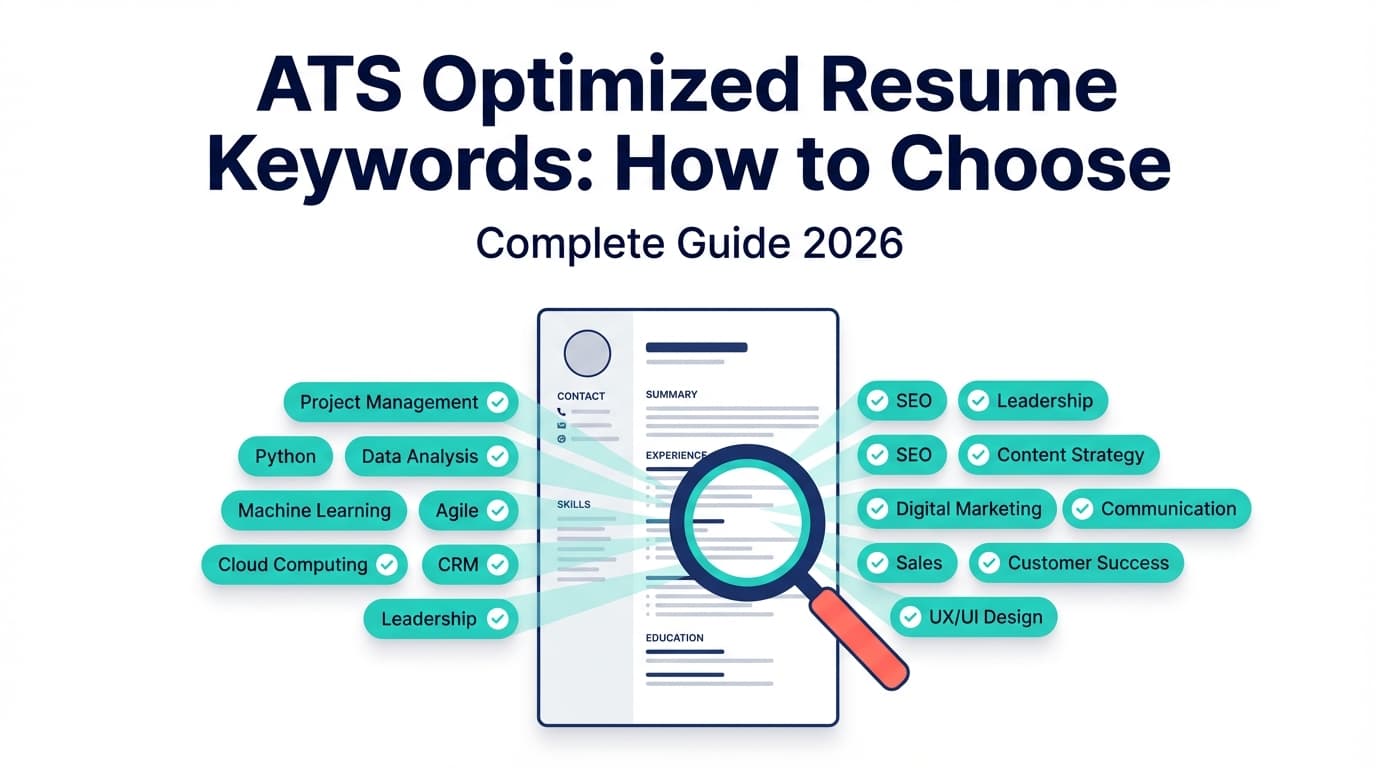
1) Keyword mapping (job → your evidence)
AI is great at scanning a job post and identifying recurring terms:
- tools (e.g., Excel, SQL, Jira),
- frameworks (e.g., Agile, ITIL),
- outcomes (e.g., reduce costs, improve retention),
- domain terms (e.g., HIPAA, SOC 2, GAAP).
But AI must map those terms to your real work. The keyword isn’t the point—the proof is.
2) Bullet rewriting (vague → measurable)
AI can quickly convert weak bullets into a stronger structure—if you control it with constraints.
3) Consistency and formatting discipline
If you’re prone to “resume design creep” (columns, icons, creative headings), a structured builder can force consistency.
Where AI doesn’t help (or creates risk)
1) “Detecting” ATS rules at every employer
ATS differs by company, configuration, and workflow. AI can’t perfectly simulate every system.
2) Knockout filters and application questions
Plenty of rejections come from requirements captured in the application form—work authorization, location, degree requirement, etc. AI can’t change that.
3) Credibility
If AI makes your resume sound perfect-but-empty, humans notice.
TopResume’s survey found:
- 19.6% of recruiters would reject an AI-generated resume or cover letter
- 33.5% of hiring managers say they can recognize an AI-generated resume quickly
(High confidence; source: https://topresume.com/career-advice/ai-in-hiring-survey)
Your biggest risk is often not ATS—it’s looking like everyone else.
What makes a resume ATS-friendly (the fundamentals)
Different sources phrase it differently, but the reliable themes are consistent:
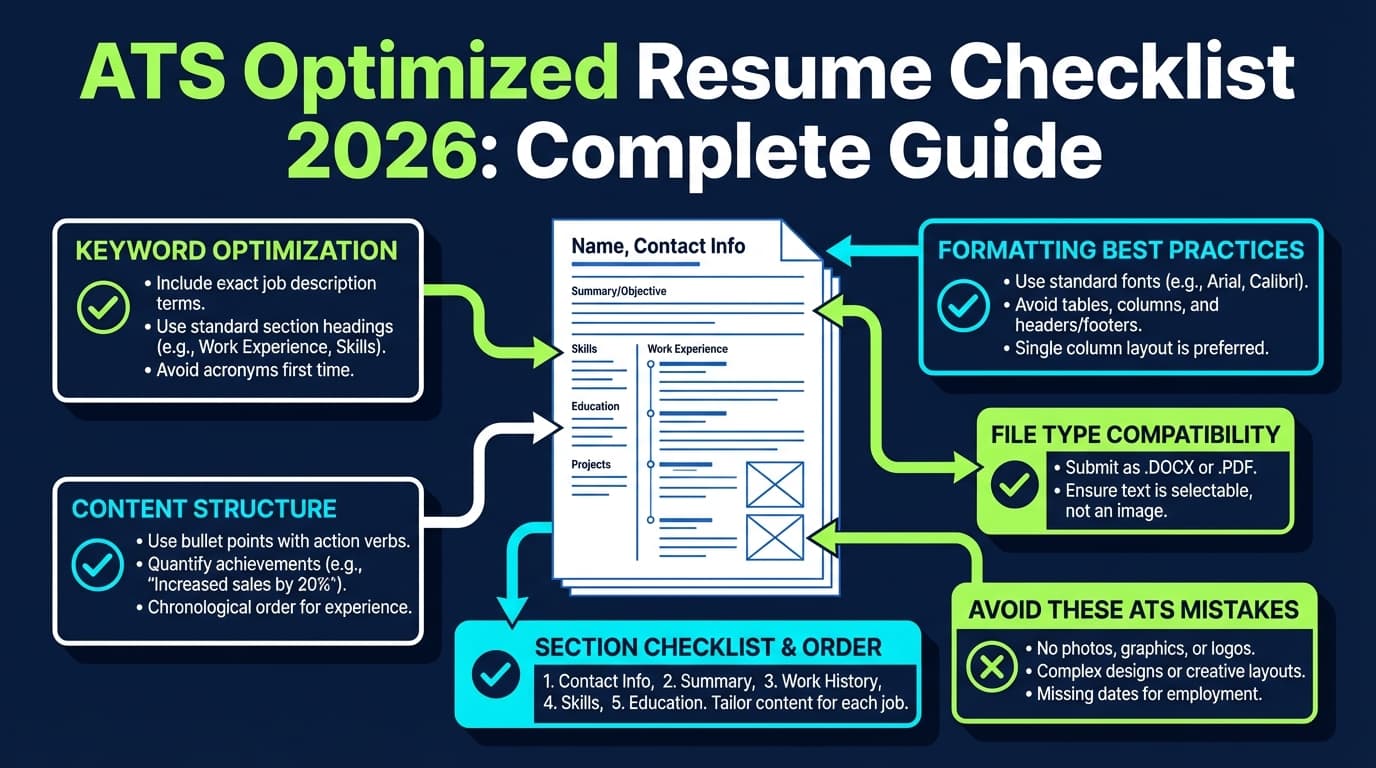
1) Use standard section headings
Examples that are widely recommended:
- Summary / Professional Summary
- Skills / Technical Skills
- Experience / Work Experience
- Education
- Certifications (optional)
Tufts Career Center recommends optimizing your resume for ATS using clear structure and standard conventions. (High confidence; https://careers.tufts.edu/resources/everything-you-need-to-know-about-applicant-tracking-systems-ats/)
2) Avoid placing critical content in headers/footers
Multiple career resources warn that ATS parsing can miss or mishandle header/footer content, especially for contact info.
- UIC Career Services’ ATS PDF guide says: “Do not use headers (including for contact information), footers…” (High confidence; source PDF: https://careerservices.uic.edu/wp-content/uploads/sites/26/2017/08/Ensure-Your-Resume-Is-Read-ATS.pdf)
- Santa Clara University’s career toolkit similarly advises avoiding critical info in headers/footers. (High confidence; source: https://www.scu.edu/careercenter/toolkit/job-scan-common-ats-resume-formatting-mistakes/)
3) Be cautious with columns, tables, text boxes, icons
Many ATS-friendly guides recommend a simple single-column layout to reduce parsing risk.
(High confidence that this guidance is common; see UIC PDF above and other university resources.)
How to use an AI resume builder for ATS: Step-by-step (with prompts)
This workflow is built for high-volume applicants who want results without wasting hours per application.
Step 1: Start with an ATS-safe “base resume” (before tailoring)
Create one master resume with:
- clean headings,
- consistent date formatting,
- one-column structure,
- simple bullets.
Goal: a resume that parses cleanly everywhere.
Quick self-check: export as PDF, copy all text, paste into plain text. If it reads in the right order, you’re usually safer.
Step 2: Extract the job’s keyword clusters (don’t just “add keywords”)
Copy the job description into a doc and mark:
- Required skills/tools (hard filters)
- Top repeated terms (likely search terms)
- Role outcomes (what success means)
- Nice-to-have tools (secondary keywords)
Then group them into clusters like:
- Tools: SQL, Tableau, Excel
- Methods: forecasting, A/B testing, stakeholder management
- Domain: fintech, risk, compliance
- Outcomes: reduce churn, improve margin, shorten cycle time
Step 3: Use AI to create a “keyword-to-evidence map”
This is the most ATS-relevant AI use case—because it keeps you honest.
Prompt: Keyword-to-evidence map
Here’s the job description and my current resume. Create a table with:
- Job keyword/requirement (exact wording),
- Evidence from my resume (quote the exact line),
- A rewrite suggestion that improves clarity and alignment without adding new facts. If there is no evidence, mark it as “Missing.”
Why it works: it forces AI to tie keywords to proof, which helps both ATS searchability and human credibility.
Step 4: Rewrite bullets using a strict structure (prevents “AI fluff”)
Use a template AI must follow:
Bullet formula:
Action verb + Tool/Skill + What you did + Outcome + Metric + Context
Prompt: Bullet upgrade (no hallucinations)
Rewrite these bullets using the formula above. Do not invent metrics or tools. If a metric is missing, write (metric needed). Keep each bullet under 2 lines.
Then you fill in real numbers or remove “metric needed.”
Example: before/after
Before (vague):
- “Responsible for reporting and dashboards.”
After (ATS-friendly, human-friendly):
- “Built weekly KPI dashboards in Excel and SQL for 6 stakeholders, reducing manual reporting time by 30%.”
Step 5: Tailor the “top third” only (fast tailoring that matters)
To avoid rewriting everything for every job, tailor:
- Headline / summary (2–3 lines)
- Skills section order (move job-relevant skills to the top)
- Top 2–3 bullets in your most relevant role
This captures most of the benefit with far less time.
Step 6: Run an “ATS parsing test” in 10 minutes
You can’t perfectly simulate every ATS, but you can catch common parsing failures.
DIY ATS test:
- Export your resume as the format you’ll submit (PDF or DOCX).
- Copy/paste the full resume into a plain-text editor.
- Verify:
- Name + phone + email are readable (and not in a header/footer)
- Company names and job titles don’t merge or scramble
- Dates appear next to the right jobs
- Bullets are in the correct order
- If the paste looks chaotic, simplify formatting and try again.
PDF vs DOCX for ATS: which should you use?
Best answer: follow the application instructions.
If both are accepted:
- DOCX is often considered safer for parsing in older or stricter systems.
- PDF can be fine if it’s true text (not an image) and your formatting is simple.
Because parsing differs by system, treat “PDF vs DOCX” as a risk-management decision:
- Applying via a portal with resume parsing fields? DOCX may reduce risk.
- Emailing a recruiter directly? PDF often preserves appearance better.
(Confidence: Medium. This varies by ATS and is debated; always follow the employer’s requested format.)
Common mistakes when using AI resume builders for ATS
Mistake 1: Keyword stuffing
If your resume reads like a list of copied job-post terms with no context, humans spot it immediately, and some systems may rank it oddly.
Fix: integrate keywords into evidence-based bullets and project context.
Mistake 2: Hallucinating skills, titles, or metrics
AI may “helpfully” add:
- tools you didn’t use,
- scope you didn’t own,
- metrics you can’t defend.
Fix: use “no new facts” prompts and verify every line.
Mistake 3: Fancy templates that break parsing
Even if a template looks modern, it can create parsing risk when it uses:
- columns,
- tables for skills,
- icons,
- text boxes.
Fix: prioritize parsability over design—especially for online portals.
UIC’s ATS PDF explicitly recommends simple formatting and avoiding headers/footers and decorative elements. (High confidence; https://careerservices.uic.edu/wp-content/uploads/sites/26/2017/08/Ensure-Your-Resume-Is-Read-ATS.pdf)
Mistake 4: Non-standard headings
“Where I’ve Been” instead of “Experience” might look clever, but it can confuse parsing and reduces scanability.
Fix: stick with standard labels.
Mistake 5: Optimizing for an “ATS score” instead of a hiring decision
Different tools score differently. A high score doesn’t guarantee interviews.
Fix: use tools to identify gaps, then optimize for:
- relevance,
- evidence,
- readability,
- credibility.
Best practices checklist (ATS + AI, without overfitting)
- Use standard headings (Experience, Skills, Education)
- Keep contact info in the body, not header/footer (UIC PDF; SCU toolkit)
- Use a single-column layout for lowest parsing risk
- Mirror the job description’s terminology only where it’s true
- Write proof-first bullets (tools + outcomes + metrics)
- Tailor the top third (summary, skills order, top bullets)
- Run the copy/paste parsing test before applying
- Keep versions (base resume + tailored variants)
Tools to help with ATS-friendly AI resumes (including JobShinobi)
JobShinobi (resume building + AI resume analysis + job matching)
JobShinobi is positioned around beating ATS with a workflow that combines:
- LaTeX resume editing with in-app PDF compilation/preview
- AI resume analysis (including ATS-focused scoring and feedback)
- Resume-to-job matching (paste a job description or URL to analyze alignment)
- An AI resume editing agent (chat-style editing)
- A job application tracker (including tracking via forwarded emails; requires Pro membership)
Pricing (accurate): JobShinobi Pro is $20/month or $199.99/year. The marketing mentions a “7-day free trial,” but trial mechanics are not clearly verified in code, so treat that as “mentioned” rather than guaranteed.
Internal links:
- /pricing
- /login
- /dashboard/resume
How to use it in an ATS workflow (practical + honest):
- Build/maintain a clean base resume in the editor.
- Run AI resume analysis to catch gaps (keywords, clarity, section issues).
- Paste the job description/URL into the job match flow for targeted suggestions.
- Apply edits and re-run analysis.
- Export your PDF and run the DIY parsing test before submitting.
Other helpful resources/tools (category-level)
- University ATS guides (great for formatting rules)
- Resume scanners (helpful for keyword gaps, not definitive truth)
- Plain-text parsing checks (fast and free)
Key takeaways
- Yes, an AI powered resume builder can work for ATS—when it improves structure, parsing safety, and keyword-to-evidence alignment.
- The bigger issue often isn’t “ATS auto-rejection.” In one recruiter interview study, 92% said ATS doesn’t auto-reject resumes based on formatting/design/content. (Enhancv; https://enhancv.com/blog/does-ats-reject-resumes/)
- Your AI risk is usually human skepticism: TopResume reports 19.6% of recruiters would reject AI-generated materials. (TopResume; https://topresume.com/career-advice/ai-in-hiring-survey)
- Use AI for mapping keywords to proof and rewriting bullets with constraints, then validate with a quick parsing test.
FAQ (People Also Ask)
Does ATS reject AI resume?
Most ATS systems are not designed to reject resumes because they were AI-written. Your bigger risk is that AI-generated content looks generic or inconsistent to humans. Enhancv’s recruiter interviews suggest content-based auto-rejection is uncommon in many ATS setups. (High confidence; https://enhancv.com/blog/does-ats-reject-resumes/)
Does ATS detect AI writing?
Typically, ATS is focused on parsing and workflow. However, employers may still react negatively to obvious AI-generated writing. TopResume reports 19.6% of recruiters would reject AI-generated resumes/cover letters. (High confidence; https://topresume.com/career-advice/ai-in-hiring-survey)
Can ATS read PDF resumes?
Often yes—if the PDF contains selectable text and uses simple formatting. But parsing accuracy varies across systems. If the portal asks for DOCX, submit DOCX. If PDF is allowed, run a copy/paste test to ensure the text order is clean.
Can ATS read columns and tables?
Some ATS parsers struggle with multi-column layouts and tables, which can scramble reading order. Multiple university/career-center resources recommend avoiding complex formatting to reduce risk. (High confidence; see UIC PDF: https://careerservices.uic.edu/wp-content/uploads/sites/26/2017/08/Ensure-Your-Resume-Is-Read-ATS.pdf)
What headings should be on an ATS-friendly resume?
Use standard headings like Experience / Work Experience, Skills, Education (plus Summary and Certifications if relevant). Standard labels improve scanability for both ATS and humans. (High confidence; consistent guidance across university resources such as Tufts: https://careers.tufts.edu/resources/everything-you-need-to-know-about-applicant-tracking-systems-ats/)
Is an ATS score accurate?
It’s a proxy, not a truth. Scores differ by tool and are best used to find missing keywords, formatting risks, and weak bullets—not to predict interview outcomes.