If you’re searching “jobshinobi vs teal resume builder”, you’re likely trying to answer a high-intent question: Which tool will actually help me land more interviews—without turning my job search into a second full-time job?
Both JobShinobi and Teal Resume Builder can help you create ATS-friendly resumes and stay organized. The difference is how they do it:
- JobShinobi is built for ATS optimization + structured resume iteration (LaTeX, scoring, job match) and adds a unique automation layer: auto-tracking applications by forwarding emails.
- Teal is built as a broader job search platform with a strong job tracker + Chrome extension workflow, lots of templates, and paid AI writing features under Teal+.
Quick Verdict:
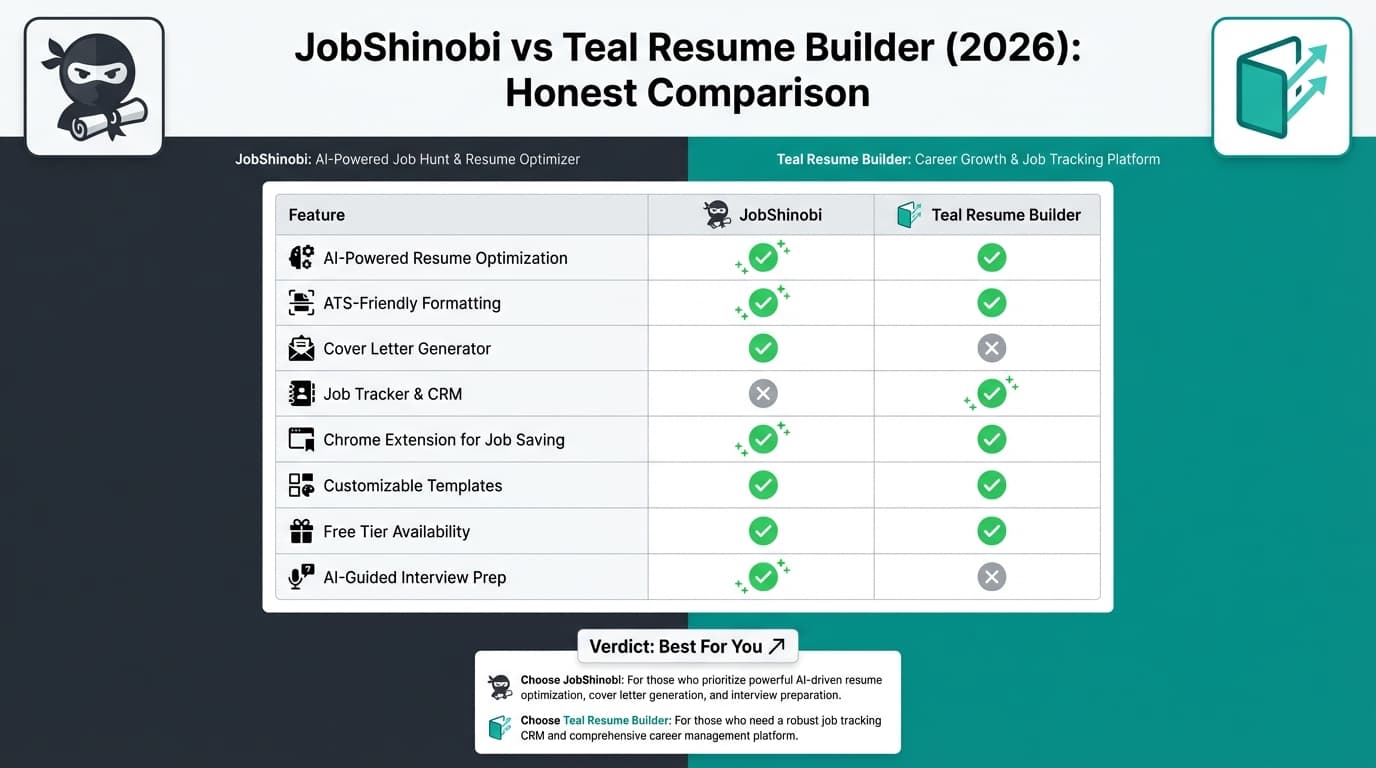
- Choose JobShinobi if you want maximum ATS control, deep resume analysis, and the fastest “set it and forget it” tracking via email-forward automation.
- Choose Teal if you want a job-search hub with a polished tracker + Chrome extension, lots of templates, and built-in cover letter/email template workflows.
Verification Notes (Important)
Some TealHQ pages returned HTTP 403 when we attempted automated page-structure analysis (their site blocks some crawlers). To keep this comparison accurate, Teal info below is verified using:
- Teal’s publicly indexed pages/snippets (tealhq.com)
- Teal’s help center snippets (help.tealhq.com)
- Chrome Web Store listing for Teal’s extension
- Third-party review/research pages (e.g., Sprout, Scale.jobs, Jobright), used only for themes, not authoritative product specs
Where Teal’s marketing snippets and help docs appear to conflict (example: export format), we call that out and recommend confirming in-product.
TL;DR Comparison
| Feature | JobShinobi | Teal Resume Builder |
|---|---|---|
| Core focus | ATS resume building + tracking automation | Job search hub (resume + tracker + extension) |
| Resume editor style | LaTeX-first editor + cloud PDF compile/preview | Guided web builder + design customization (per help center topics) |
| ATS scoring / analysis | ✅ Detailed resume scoring breakdown + feedback | ✅ Advanced analysis + keyword matching (Teal+ messaging) |
| Job description → matching | ✅ Job extraction + resume-to-job match + missing keywords | ✅ “Resume Job Description Match” + Job Matcher (free has limited keywords; Teal+ shows more per help snippet) |
| Job tracking | ✅ Tracker + analytics + Excel export | ✅ Tracker + CRM-style organization + export/report options (per help snippets) |
| Automation differentiator | ✅ Forward emails → auto-log applications/status | ✅ Chrome extension to save jobs + “Super Search” across many boards (public listing/snippets) |
| Templates | LaTeX templates (database-driven) | 100+ templates marketed (teal resume templates pages/snippets) |
| Cover letters / email templates | Not a primary differentiator | ✅ Cover letters + email templates per job stage (Teal pricing/tracker snippets) |
| Starting paid price | $20/month | $29/month (Teal+) + weekly/quarterly options |
| Best for | Power users who want ATS precision + automated tracking | Users who want “everything in one place” + extension workflow |
JobShinobi Overview
JobShinobi combines three workflows that typically live in separate tools:
- ATS-first resume building (LaTeX-based templates, editor, compile-to-PDF preview)
- Resume scoring + keyword feedback (including job matching)
- Job application tracking, with a standout capability: email-forwarding automation
Instead of manually updating a spreadsheet or tracker, JobShinobi gives you a unique forwarding address. When you forward application confirmations and recruiter updates, JobShinobi uses AI to extract fields like company, role, and status and updates your tracker (with fuzzy matching to avoid duplicates).
Key Strengths
- Email forwarding → automatic job tracking: Forward job emails; JobShinobi parses and logs/updates applications automatically (Pro-gated).
- LaTeX resume workflow + PDF preview: Structured editing with predictable output.
- Resume scoring + ATS feedback: Breakdown across multiple dimensions (keywords/formatting/ATS/completeness, etc.).
- Job matching: Extract job details from a job post and compare against your resume to surface gaps.
- Version history: Built for iterative tailoring (save versions, undo/revert workflows).
- Analytics dashboard: Response rate, interview conversion, trends—so you can adjust strategy.
Limitations (Honest)
- LaTeX learning curve: Some users will prefer a more visual drag-and-drop builder.
- Automation is Pro-gated: Email processing is restricted to paying users.
- Migration may be manual: No dedicated “import from Teal” flow is advertised; expect copy/paste or rebuild.
Teal Resume Builder Overview
Teal positions itself as an all-in-one career platform: resume builder, job tracker, and a Chrome extension to manage opportunities as you browse.
From publicly indexed Teal pages and help-center snippets, Teal emphasizes:
- Unlimited resumes on the free plan (marketed in tealhq.com snippets)
- Job tracking with CRM-like organization
- Chrome extension (“Teal - Job Search Companion”) to save jobs/companies/contacts in one place
- “Super Search” to search across multiple job boards from the extension (Chrome Web Store listing snippet and Teal pages reference searching across 40+ boards)
- Templates (Teal markets 100+ free resume templates)
- Job matching/keyword tools, where Teal+ unlocks more (help center snippet indicates free users see a limited set of keywords, Teal+ users see unlimited)
Key Strengths (Verified via public listings/snippets)
- Best-in-class browser workflow: Teal’s Chrome extension is a major differentiator for saving roles quickly while researching.
- Templates and design controls: Teal promotes 100+ templates and help articles indicate resume presentation customization options.
- Cover letter + email templates: Teal markets “matching cover letters” and “email templates per job stage.”
- Import options: Teal help content indicates you can import from LinkedIn or an existing .docx / .pdf resume file (per indexed help snippets).
Limitations (Common themes from reviews/discussion)
- Paid plan value is subjective: Many users like Teal’s free tracker and debate whether Teal+ is necessary.
- AI output quality varies: As with most AI writing tools, the results depend heavily on prompts, context, and editing.
- Some limitations depend on plan: Keyword visibility and “advanced” analysis depth appear more gated behind Teal+.
Feature-by-Feature Comparison
1) Resume Building Experience (Editing + Output)
JobShinobi
- Built around LaTeX: you edit structured content and compile to a PDF preview.
- Great if you want consistent formatting, predictable layout, and repeatable tailoring across roles.
Teal
- Built around a guided resume builder + design/presentation controls (based on Teal’s help-center topics and marketing).
- Better for users who want a more visual, mainstream workflow.
Winner: Depends on your working style
- Want precision + structure: JobShinobi
- Want speed + guided UI: Teal
2) ATS Optimization & Keyword Matching
JobShinobi
- Resume scoring with a detailed breakdown (including ATS/keyword feedback).
- Job description extraction + resume-to-job matching with missing/present keyword insights.
Teal
- Public Teal pages promote keyword matching and resume/job description match tools.
- Teal help snippets indicate free users see a limited keyword view, while Teal+ shows unlimited keywords (notably in Job Matcher).
Winner: Slight edge to JobShinobi for depth + iteration
- If your priority is an analysis loop tightly connected to versioning and structured edits, JobShinobi tends to fit better.
- If you want keyword guidance inside a broader job-search platform, Teal is strong.
3) Job Tracking & Automation
This is the biggest practical difference in the jobshinobi vs teal resume builder decision.
JobShinobi: “Inbox-powered” automation
- You forward application emails.
- AI parses the email and logs/updates applications automatically (including status changes).
- Best for people who apply frequently and don’t want to manually update anything.
Teal: “Browser-powered” automation
- Teal’s Chrome extension is positioned to let you save jobs from job boards quickly and keep everything organized.
- Teal also promotes “Super Search” (search across many boards at once) as part of the extension workflow.
Winner: Depends on where your job-search data lives
- If the source of truth is your email: JobShinobi
- If the source of truth is your browser research + saved roles: Teal
4) Templates, Presentation & Customization
JobShinobi
- LaTeX templates stored and managed inside the platform (template-based resume starts).
Teal
- Teal markets 100+ resume templates (teal resume templates pages/snippets).
- Teal’s help-center topics suggest a strong focus on presentation controls and templates.
Winner: Teal (for template variety + design-first UX)
5) Cover Letters & Outreach Templates
JobShinobi
- Strong resume tailoring + tracking focus; cover letters and outreach templates are not positioned as the main differentiator.
Teal
- Teal markets matching cover letters and email templates per job stage.
- Teal job-tracker pages also reference a library of email templates for follow-ups.
Winner: Teal (for cover letters + outreach templates)
Pricing Comparison (Current as of 2026-01-21)
| Plan | JobShinobi | Teal Resume Builder |
|---|---|---|
| Free | Limited (email-forward automation requires Pro) | Free plan marketed (resume builder + tracker) |
| Monthly | $20/month | $29 / every 30 days (Teal+) |
| Weekly | — | $13 / every 7 days (Teal+) |
| Quarterly | — | $79 / every 90 days (Teal+) |
| Yearly | $199.99/year | Not confirmed from indexed snippets |
Value analysis
- If you want a simple monthly subscription and your core needs are ATS optimization + tracking automation, JobShinobi is cheaper at $20/mo.
- If you’ll mainly use free job tracking + templates and only occasionally need premium AI, Teal’s free tier can be compelling.
- Teal’s weekly plan can be useful for short bursts—but it can also become expensive if you forget to cancel.
Who Should Choose JobShinobi?
Choose JobShinobi if you:
- want job tracking that updates itself from forwarded emails (huge time saver)
- want deep resume scoring + job matching to tailor fast for each role
- prefer a structured, ATS-first resume workflow (LaTeX + PDF preview)
- care about version history and iterative tailoring at scale
Who Should Choose Teal Resume Builder?
Choose Teal if you:
- want a job search command center with a polished tracker experience
- rely on a Chrome extension to save jobs quickly as you browse job boards
- want lots of templates + design controls
- want cover letters + outreach workflows (email templates per stage)
- want to start on a strong free plan and upgrade only if needed
Switching from Teal to JobShinobi (What to Expect)
- Data migration: Teal help content references export/report options for job tracker activity; however, exports may not include everything (community discussions often mention missing notes/interview details). JobShinobi supports exporting job tracker data to Excel. In practice, many users will migrate by bringing over key roles manually and starting fresh tracking automation via email forwards.
- Learning curve: Expect a ramp-up if you’re new to LaTeX. If you’ve been frustrated by formatting tools breaking layouts, the tradeoff is often worth it.
- Workflow shift: If Teal’s extension is central to your process, you can keep using that browsing habit—then rely on JobShinobi to track what happens after you apply via email confirmations.
FAQ
Is JobShinobi better than Teal Resume Builder?
Not for everyone. Teal is often better for users who want an all-in-one job-search hub with a browser extension and lots of templates. JobShinobi is better for users who want ATS precision, deep analysis, and especially automated tracking via forwarded emails.
Does Teal support importing an existing resume?
Yes—Teal help content indicates you can import from LinkedIn or upload an existing resume file (.docx or .pdf) to import data.
Can Teal export to Word (.docx)?
This is one area where Teal’s public messaging can be confusing. Some Teal marketing snippets mention exporting as DOC/PDF, while indexed Teal help content states PDF is the only export option at this time and .docx may be planned. Confirm inside your Teal account before deciding based on export format alone.
Which is cheaper: JobShinobi or Teal?
On paid monthly pricing, JobShinobi ($20/mo) is cheaper than Teal+ ($29/mo) based on indexed Teal pricing snippets. Teal may be cheaper overall if the free plan covers your needs.
What’s the biggest difference in daily use?
Automation style:
- JobShinobi automates tracking from your inbox (forward emails → tracker updates).
- Teal automates capture from your browser (extension → save jobs fast, plus multi-board search).