If you searched “JobShinobi free vs paid resume builder”, you’re likely trying to answer one of these questions:
- “Do I really need to pay for a resume builder?”
- “Is JobShinobi’s Pro plan worth it, or should I just use a traditional paid resume builder?”
- “What do I actually get when I pay—better resumes, more interviews, or just more templates?”
This page is a practical, fair comparison between JobShinobi (Free vs Pro) and the broader category of paid resume builder subscriptions (examples include Resume.io, Zety, ResumeBuilder.com, and MyPerfectResume). Because “Paid Resume Builder” isn’t one single product, we reference verified pricing and feature language from these providers where relevant.
Quick Verdict:
- Choose JobShinobi Pro if you want a tool that goes beyond templates and helps you beat ATS, tailor to job descriptions, and track applications—especially with its email-forwarding → automatic job tracking.
- Choose a traditional paid resume builder if your main goal is to produce a polished resume fast with a guided editor and lots of templates—and you don’t need a full job-search workflow.
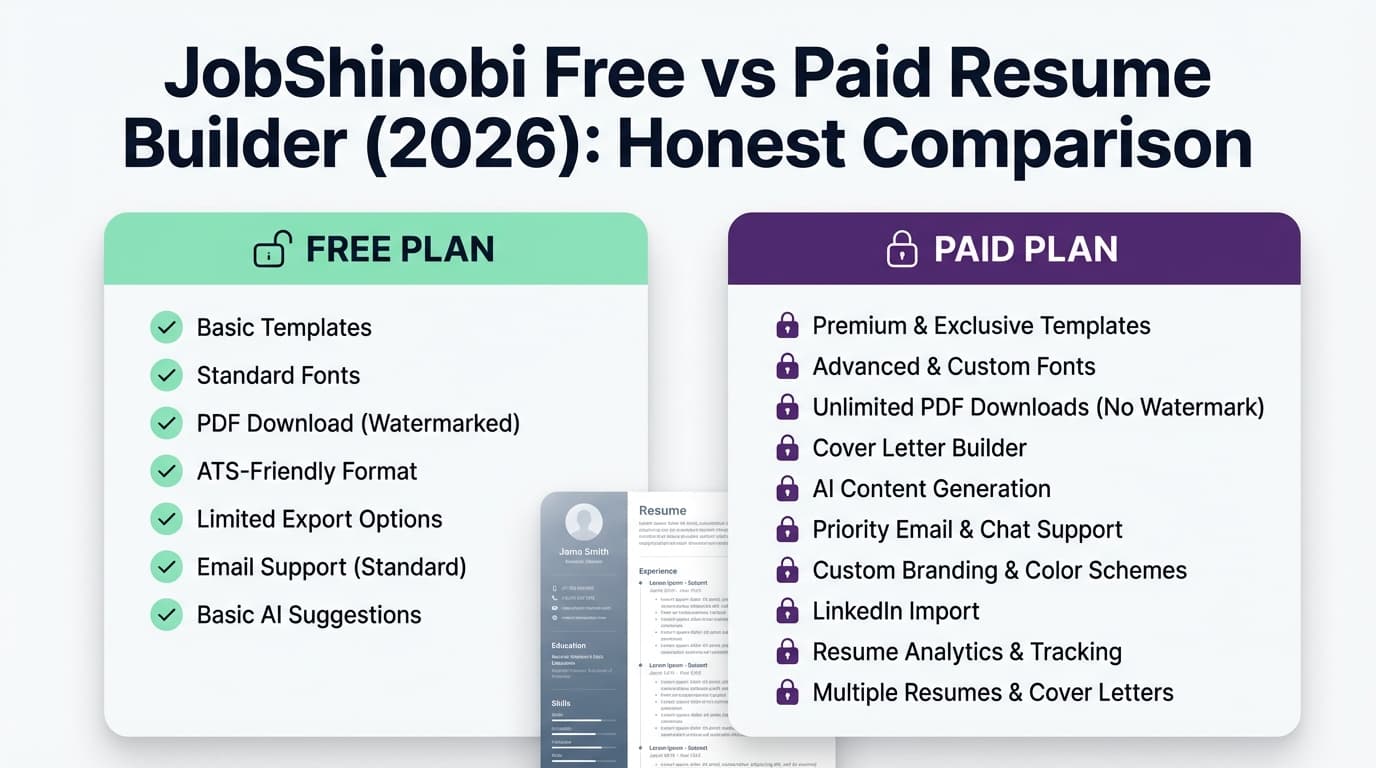
TL;DR Comparison
| Feature | JobShinobi (Free) | JobShinobi (Pro) | Paid Resume Builder Subscriptions (typical) |
|---|---|---|---|
| Resume builder | ✅ Yes (limited) | ✅ Yes | ✅ Yes |
| ATS scoring & structured feedback | ✅ Yes (resume scoring exists) | ✅ Yes | ⚠️ Varies; often “ATS-friendly templates,” depth varies by vendor |
| Job description matching (extract JD → match + missing keywords) | ✅ Yes | ✅ Yes | ⚠️ Some tools offer “tailoring,” but not standardized across vendors |
| AI resume agent (chat edits resume + verifies output) | ✅ Yes | ✅ Yes | ⚠️ Usually AI suggestions, not an agent workflow (varies) |
| LaTeX-based resume workflow + PDF compilation preview | ✅ Yes | ✅ Yes | ❌ Usually WYSIWYG editor (Word-like) |
| Version history / revert workflow | ✅ Yes | ✅ Yes | ⚠️ Varies by vendor |
| Job tracker + analytics dashboard | ✅ Yes | ✅ Yes | ⚠️ Some vendors add job tools (e.g., job board/auto apply), but not universal |
| Email-forwarding → auto-track applications from confirmation emails | ❌ No | ✅ Yes (Pro-gated) | ❌ Not a standard feature |
| Starting price | $0 | $20/mo or $199.99/yr | Usually low-cost trial, then subscription (varies by vendor) |
| Best for | Testing ATS/tailoring tools | Serious job search + tracking + optimization | Fast resume creation + templates + downloads |
JobShinobi Overview (Free vs Pro)
JobShinobi is an AI Resume Builder + ATS Resume Analyzer that also includes a built-in job application tracker and job search analytics. The product is designed for people who aren’t just trying to “format a resume,” but are trying to improve outcomes: more callbacks, more interviews, better conversion rates.
What you can do in JobShinobi (core capabilities)
- Build resumes using a LaTeX template workflow (consistent structure and formatting).
- Use an AI resume agent (chat-based) that can update your resume content.
- Generate resume scoring / ATS feedback (structured breakdown + keyword-related analysis).
- Paste a job URL or job description and get resume-to-job matching insights.
- Track applications in a job tracker and view analytics (response rates, trends).
The big Free vs Pro difference
The standout “this changes how you job search” feature is Pro-only:
- Email forwarding → automatic job tracking (Pro): You get a unique forwarding address; you forward job-related emails (like application confirmations), and JobShinobi uses AI to extract details (company, title, status, etc.) and logs/updates your tracker automatically.
Key Strengths
- Automation that reduces admin work: Pro email parsing can remove a lot of spreadsheet/manual-entry busywork.
- Optimization loop (tailor → apply → track → learn): job tracker + analytics makes it easier to improve your strategy.
- Tailoring depth: resume scoring + job matching makes it more than “pick a template.”
Limitations (honest)
- Not a classic Word-style editor: If you strongly prefer drag-and-drop/WYSIWYG, JobShinobi’s LaTeX-first approach may feel unfamiliar.
- Free tier won’t include the signature automation: Email-based auto-tracking is Pro-gated, so heavy appliers will likely want Pro.
- If you only want a one-time resume download: A traditional paid resume builder trial can be cheaper upfront for “build once, download once” use.
Paid Resume Builder Subscriptions Overview (What “Paid” Usually Means)
A “paid resume builder” is typically a subscription service that helps you create a resume with:
- A guided editor (step-by-step sections)
- Design templates and customization
- Resume downloads (commonly paywalled behind a plan)
- Optional extras: cover letters, job tools, AI suggestions
Verified examples: pricing patterns (as of 2026-01-21)
These are examples of real pricing pages/snippets from well-known resume builders:
- Resume.io: shows a $2.95 7-day trial and indicates it auto-renews to a recurring plan billed every ~4 weeks (pricing snippet commonly shows $29.95 billed every 4 weeks).
Source: https://resume.io/pricing and Resume.io billing FAQ: https://help.resume.io/article/28-how-does-billing-work - Zety: shows a $1.95 14-day trial, then auto-renews at $25.95 billed every 4 weeks (also displays an annual option on the pricing page).
Source: https://zety.com/pricing - Resume Genius: shows a $2.95 14-day trial that auto-renews at $23.95 billed every four weeks (per pricing page snippet in search results).
Source: https://resumegenius.com/pricing (note: direct page fetch may be restricted in some environments) - ResumeBuilder.com: states $2.95 during the 14-day trial period on its pricing page.
Source: https://www.resumebuilder.com/pricing/ - MyPerfectResume: pricing snippet shows $2.95 for 14 days, auto-renews at $23.95 billed every 4 weeks.
Source: https://www.myperfectresume.com/pricing (pricing snippet in search results)
Key Strengths (where paid resume builders often win)
- Speed + ease for beginners: guided UI can be the fastest way to produce a decent resume.
- Template variety: lots of designs and layouts, often easier to visually customize than LaTeX.
- Mainstream file formats: many users prefer tools that clearly support PDF and sometimes Word/DOCX exports.
Limitations (common themes in user discussions)
Not every vendor is the same, but recurring themes across reviews/discussions include:
- Trial → auto-renew surprises if you forget to cancel (this is also explicitly described in several pricing pages).
- Download paywalls: you can often build “for free” but need to pay to export a professional format.
- Less emphasis on tracking + analytics: many tools focus on the document, not the whole job-search process.
Feature-by-Feature Comparison
1) Resume building experience (editor + templates)
JobShinobi (Free/Pro):
- LaTeX-based templates + cloud compilation and PDF preview.
- Great for consistency and controlling structure.
- Better suited to users who want a “source of truth” resume and iterate versions.
Paid resume builder subscriptions:
- Usually WYSIWYG and form-driven.
- Strong template browsing and quick edits.
- Often easiest if you’ve never built a resume before.
Winner: Paid resume builders for ease and speed; JobShinobi for structure control and repeatable tailoring.
2) ATS optimization + actionable feedback
JobShinobi (Free/Pro):
- Provides resume scoring with breakdowns (including ATS-oriented analysis, keyword analysis, formatting/completeness signals).
- Designed to help you identify why a resume might be underperforming.
Paid resume builders:
- Many market “ATS-friendly templates,” which can help.
- But the depth of feedback varies widely: some are template-first and provide limited diagnostics.
Winner: JobShinobi, if your goal is improving interview rate—not just formatting.
3) Tailoring to a specific job description
JobShinobi (Free/Pro):
- Paste a job URL or text description → extract requirements and keywords.
- Generates match insights and helps you tailor.
Paid resume builders:
- Some vendors offer “tailored content” or AI suggestions, but job-specific matching is not consistent across the category.
Winner: JobShinobi for a consistent job-matching workflow.
4) AI assistance (agent vs suggestions)
JobShinobi (Free/Pro):
- AI “agent” chat that can update the resume and support iterative changes.
- Built around editing and validating the resume output (especially in a LaTeX workflow).
Paid resume builders:
- Commonly offer AI summaries, bullet suggestions, and phrasing help.
- Usually not positioned as a compile/verify editing agent.
Winner: JobShinobi for iterative tailoring; paid builders can still win if you just want quick AI-generated text.
5) Job tracking + analytics (the biggest functional difference)
JobShinobi (Free/Pro):
- Built-in job application tracker (CRUD, export to Excel).
- Analytics dashboard (response rate, conversion trends).
Paid resume builders:
- Some providers are expanding beyond resumes into job tools. For example, Resume.io’s homepage includes sections like “Recruiter Match,” “Job Board,” and “Auto Apply” (as presented in their site headings).
Source: Resume.io homepage analysis (https://resume.io/)
Winner:
- JobShinobi if you want a dedicated application tracker + analytics loop.
- A paid resume builder can be compelling if its add-on job tools match your workflow (and you prefer a guided resume editor).
6) Email-forwarding automation (JobShinobi Pro differentiator)
JobShinobi Pro:
- Forward job-related emails to a unique address.
- JobShinobi parses the email and updates your tracker automatically (including fuzzy matching to avoid duplicates).
Paid resume builders:
- This is not a standard category feature.
Winner: JobShinobi Pro.
Pricing Comparison (Examples You Can Verify)
Because “Paid Resume Builder” pricing varies by vendor, here’s a practical comparison using public pricing pages/snippets.
| Plan Type | JobShinobi | Paid Resume Builder examples (varies by vendor) |
|---|---|---|
| Free | $0 | Often $0 to start building, but downloads may be limited/paywalled |
| Monthly | $20.00/month (Pro) | Often converts to recurring billing after a trial (e.g., every 4 weeks) |
| Annual | $199.99/year (Pro) | Many offer annual options (terms vary) |
| Trial/intro pricing | Marketing mentions “7-day free trial” (confirm at checkout) | Examples: Resume.io $2.95 / 7 days; Zety $1.95 / 14 days; ResumeBuilder.com $2.95 / 14 days; MyPerfectResume $2.95 / 14 days |
Value analysis (when each is “worth paying for”):
- If you only need a resume one time, a paid builder trial can be cost-effective—just be intentional about cancellation if you don’t want ongoing billing.
- If you’re applying seriously and iterating often, JobShinobi Pro can be better value because it adds:
- ATS scoring and tailoring workflows
- Job tracking + analytics
- Email-forwarding automation (time saver)
Who Should Choose JobShinobi Free?
Choose JobShinobi Free if you:
- Want to explore ATS scoring and job-matching concepts before paying.
- Are building a baseline resume and don’t need automation yet.
- Prefer a “resume as a system” approach, but you’re not ready to commit.
Who Should Choose JobShinobi Pro?
Choose JobShinobi Pro if you:
- Apply to many jobs and want to track applications without spreadsheets.
- Want the email-forwarding → automatic job tracking workflow to reduce admin time.
- Tailor resumes often and want repeatable versioning + matching + feedback.
- Care more about interview conversion than just aesthetics.
Who Should Choose a Paid Resume Builder Subscription?
Choose a paid resume builder if you:
- Want the easiest guided experience and lots of templates.
- Prefer a traditional editor and straightforward exporting.
- Don’t need a job tracker/analytics loop (or you already track elsewhere).
- Mainly want a quick resume, not a job-search operating system.
FAQ
Is JobShinobi “better” than a paid resume builder?
Not for everyone. If your main goal is fast, guided resume creation, many paid resume builders are simpler. If your goal is improving interview outcomes through ATS feedback, job matching, and tracking, JobShinobi (especially Pro) is often the stronger fit.
Why do paid resume builders feel “cheap” upfront?
Many vendors advertise a low-cost trial (e.g., a few dollars for 7–14 days). Several also state that the plan auto-renews if not canceled (see their pricing pages and billing FAQs). If you only need short-term access, set a reminder to cancel.
Does JobShinobi have job tracking?
Yes. JobShinobi includes a job application tracker and analytics. Pro adds the automation layer: forward emails and have applications logged automatically.
Can paid resume builders also help with job applications?
Some are expanding into job-search features. For example, Resume.io markets add-ons like Job Board, Recruiter Match, and Auto Apply on its homepage, and provides help-center content around job search features. The exact availability and quality can vary by region and plan, so verify on the vendor’s site.
Which is cheaper overall?
If you only need one resume download, a short trial from a paid resume builder may cost less upfront. If you’re in an active job search and need ongoing tailoring + tracking, JobShinobi Pro’s subscription can deliver more value per month because it replaces multiple tools (resume builder + ATS feedback + tracker + analytics).